Table of Contents
- Purpose
- Adjusting the default invoice reference for the entire account
- Adjusting the invoice reference for a single customer
- Adjusting the invoice reference when pushing an invoice
Purpose
When utilising CartonCloud's accounting integration for both Xero and MYOB you can select a reference to be applied to each invoice generated within the Accounting Software.
This reference is saved against the following fields in the Accounting Connectors:
1) In Xero as Reference
2) In MYOB as JournalMemo
This can be configured on a per-Customer basis, by editing the Customer settings, or it can be configured for all customers through the Organisation settings.
Please note that customer settings will override the organisation settings for a particular field if both settings are configured.
Adjusting the default invoice reference for the entire account
-
Navigate to the Organisation Settings, More>Organisation Settings.
- Select the Invoice tab.
- Scroll down to the Default Invoice Reference.
- Here you can customise the reference by either writing in the text that will appear on each invoice or using one of the Placeholders.

The Placeholders include: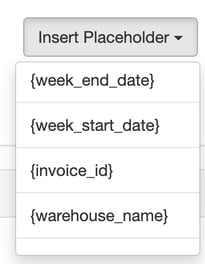
If you select Apply to all Customers you will override every Customer's individual setting inside their Customer record. Only ever tick this if you want to update ALL Customers.
The placeholders will be replaced automatically with their value when the Invoice Reference is imported into your accounting software.
Adjusting the invoice reference for a single Customer
- Navigate to the Customers page, Contacts>Customers.
- Select the relevant Customer and click Edit.
- Select the Invoice tab and then the Accounting Connector tab.

- Scroll down to the Default Invoice Reference.
- Here you can customise the reference by either writing in the text that will appear on each invoice or using one of the Placeholders.

The Placeholders include: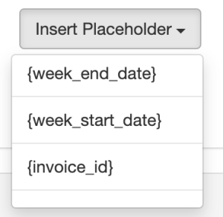
Adjusting the invoice reference when pushing an Invoice
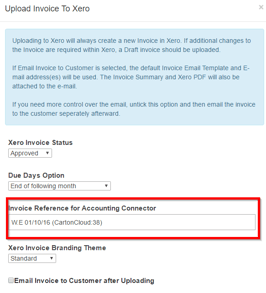
When pushing invoices to your Accounting Application manually, you're able to control the Reference which is sent, these changes will only affect the invoice you are pushing, and will not interfere with any Organisation or Customer settings.