
🔔 Note: this article is part of the CartonCloud Academy - TMS Charging Trail. This is the first article in the Trail. 🎓
Welcome to the Transport Charging Trail! In this Trail, you will be guided through how to make the most of the CartonCloud transport charging system.
Transport charges in CartonCloud are highly customisable, allowing you to configure charges to best suit your customer and operational needs. Using sophisticated charging methods and configurations, CartonCloud’s transport rating system allows you to create a seamless and automated rating process.
There are a few components that need to be set up in CartonCloud in order to be able to create transport rates. You need income zone sets and a rate card. Income zone sets are the geographical areas that you define for charging purposes. When you create your transport rates you will choose a from and to income zone to determine what consignments will use the rate you are creating. Rate cards house the rates you create and are associated with one or more customers.
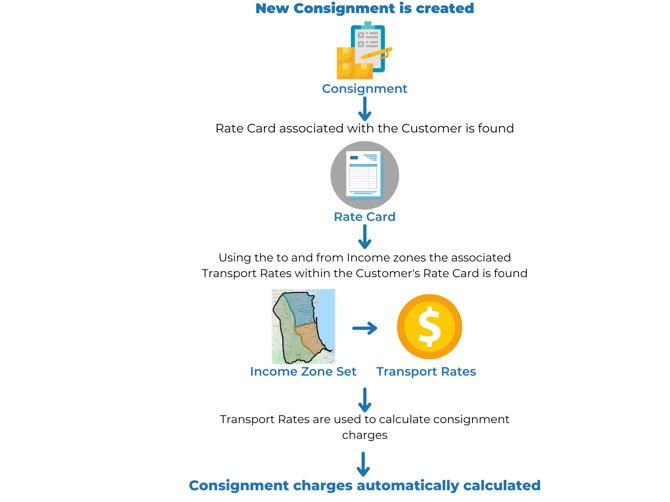
CartonCloud will use the Rate Card you have created for your customer and the income zone sets (set up in the TMS Basic Set up trail) to determine what and how rates are applied to orders. The rates are automatically calculated and then added to the customer’s invoice at the end of the invoice period (or during, depending on your invoice settings).
The below diagram helps explain how CartonCloud uses Income Zone Sets, Rate Cards, and Transport Rates to automatically calculate consignment charges.
Nick from Coffee Warehousing and Distribution is excited to start using CartonCloud’s transport rating system. Coffee Warehousing and Distribution previously had to calculate all their Customer’s charges manually, with their rates kept in different excel sheets and documents that sometimes were hard to keep track of. Therefore, there were sometimes rate discrepancies and customers questioning their invoices. Now that Coffee Warehousing and Distribution are using CartonCloud all the rates will be automatically calculated and applied to customers' invoices, avoiding the need for manual administrative tasks and increasing rating accuracy.
Understanding Rate Cards
Rate Cards are fundamental to the warehouse rating system in CartonCloud. A Rate Card determines what prices your Customer will be charged for your Warehouse and/or Transport services. It also contains the settings that determine how the charges will be applied.
Every Customer in CartonCloud has a Rate Card associated with it. By default, the Rate Card associated will be the Default Rate Card; however, you will be able to change this.
Follow along with Brittany as she explains what a Rate Card is and how to create one in your CartonCloud account. Please note, this video mentions warehouse charging, however, the Rate Card set up is applicable to transport charging as well.
Need to create another Rate Card?
To create another Rate Card it is suggested you duplicate the first Rate Card you created to save time. Once you have duplicated the Rate Card you can make the necessary changes as required. To duplicate a Rate Card you can follow this process - Add/Duplicate a Rate Card
How to create a Transport Rate
Now that you understand what a Rate Card and Income Zone Set is we can take a deeper dive into transport rates.
Transport rates are created within the rate card. You will define a to and from income zone to determine what consignments will be utilising the rate you are creating. From here you will then be able to configure the rate, customising the charges to suit your charging requirements.
Follow along with Tony as he explains how to create a Transport Rate.
Nick from Coffee Warehousing and Distribution now understands the basic principles of creating a transport rate. He is looking forward to the next module where he will learn how each charging method works and he can decide how he would like to set up his transport rates.
▶️ Follow along in the TMS Charging Trail...next up is Charging Methods 🎓