
Table of Contents
Purpose
By default CartonCloud charges for Consignments regardless of their delivery status. However, if you want to set up a rule so that when consignments are set to a particular status such as cancelled then they do not charge, then this article will show you how.
Additionally, you can also name these cancelled statuses to be called whatever you want.
How to steps
- To begin, select Transport in the main menu, followed by Consignments in the drop-down menu.
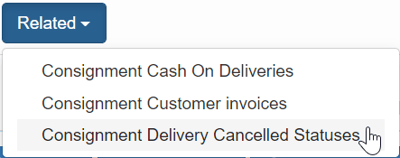
- Then on the Consignments page, select Related, followed by Consignment Delivery Cancelled Statuses from the drop-down menu.
- Now on the Consignment Delivery Cancelled Statuses page you can see that all for all statuses Is Charged is currently set to Yes. To make the system not charge for a particular Status then this setting needs to be set to no.
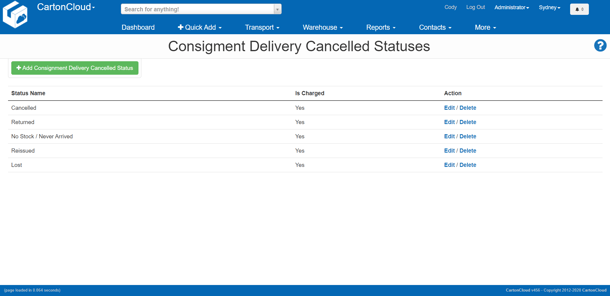
- For example, to make the Cancelled Status stop charging for a Consignment select Edit
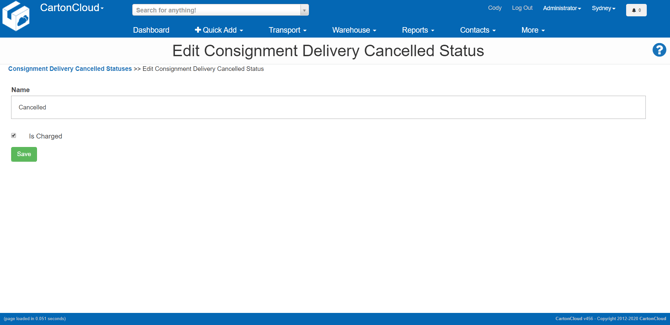
- Then untick the Is Charged box.
- Optionally, you can also rename the Status (perhaps your operation calls a cancelled job something slightly different).
- Finally, select Save.
- Now the next time a cancelled Consignment has its charges automatically calculated by the system (either when it gets put on an invoice, or the Automatically calculate income charges button is clicked on the consignment charge tab).