Table of Contents
Purpose
This document explains how CartonCloud automatically selects a Delivery Run for a specific Consignment.
There are two ways in which the allocation process operates:
- Default Operation (Onforwarder Addresses Disabled)
- Onforwarder Addresses Enabled
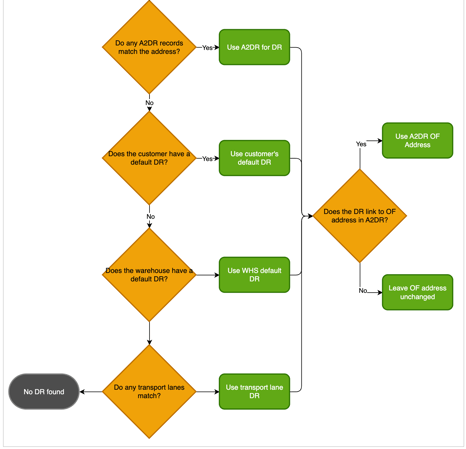
Once Transport Lanes have been enabled on your CartonCloud account, please refer to the last diagram on this page.
Note the below workflows are impacted by the following settings. Please keep these settings in mind when calculating how the Delivery Run is calculated for a Consignment:
Customer Settings:
- Delivery Run Dates
- Ignore Specified Delivery Run Date (allocate to next Scheduled Run Date always)
- When a Required Delivery Date is given, snap the delivery to the closest available scheduled date (if unchecked, consignment may get allocated to a date where the run isn't scheduled)
Organisation Settings:
- Bulk Allocation Configuration
- Allocate Run Sheets Defaults
- Default "Override Cosnignments Delivery Run" checkbox to checked on Bulk allocation and Move Consignments Screens
- Allocate Run Sheets Defaults
1. Default operation (onforwarder address disabled)
By default, Onforwarder Addresses are disabled so the Allocation process is very straightforward: 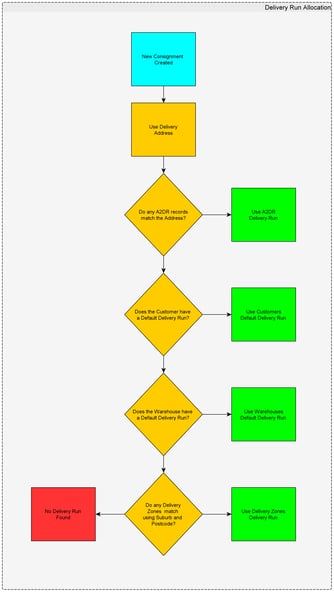
2. Onforwarder Addresses Enabled
To learn more about what Onforwarder Addresses are, and how to use them, see our page on Onforwarder Addresses
Enabling Onforwarder addresses changes the logic for the Delivery Run allocation whenever Onforwarder addresses are used.
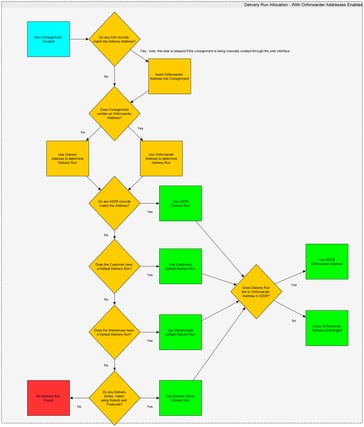
Noteworthy points are:
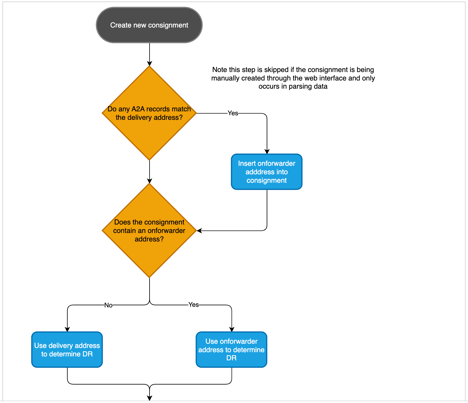
- If an onforwarder address has been specified when creating a consignment (which can only be done through the web interface as imported manifests only contain the delivery address), then the onforwarder address will be used to handle the allocation.
- When importing a manifest the system will try to automatically insert the onforwarder address if possible by using the A2DR data to perform a Reverse Mapping (a mapping from Delivery Run --> Onforwarder Address)