
Table of Contents
Purpose
If you need to update the customer email and notification settings in bulk, you can do so by exporting the Customer's Emails from the Customers page. You can then edit the file and then import the updates back into CartonCloud. This can be very useful when you want to change email settings for customers in bulk.
How to export the customer's emails and update the notification settings
-
Navigate to the Customers page, Contacts>Customers.
-
Select Related>Export Customers Emails.
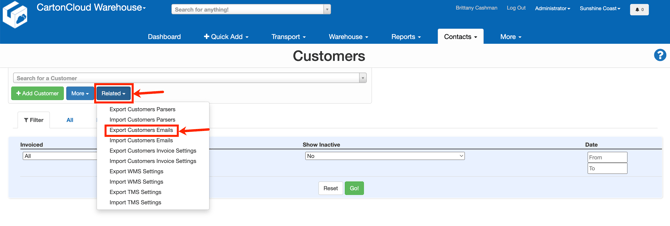
- Open the file and use the table descriptions below to make changes to the relevant settings that you wish to update.
- Once you have made the relevant changes to the file, save it and navigate back to CartonCloud.
- Click Related>Import Customers.
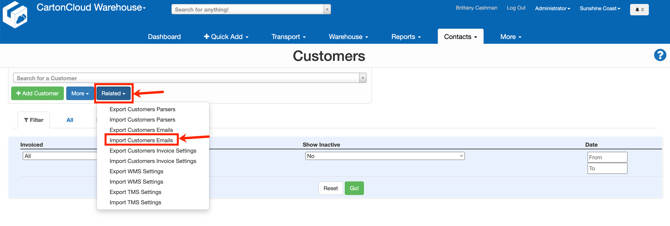
- Select the file and click Upload File.
| Field Prefix | Field | Description | Allowed Values |
| customers_emails | id | ID of the Customer these settings relate to. | <integer> (A whole number) |
| customers_emails | customer | Name of the Customer. | <string> (Text) |
| customers_emails | The email address that has been set up within the specific customer settings. | <string> (Text) | |
| customers_emails |
name |
User name assigned to the email when created in the customer settings. | <string> (Text) |
| customers_emails |
Sale order notification through to Stock Update Notification |
Name of the notification available. If you enter To in the notification column against the email address, this will enable the notification for that particular email address. If you leave this field blank, the notification will not be enabled for the email address. | To |
| customers_emails | parsers accepted from | Name of parsers that the user has the approval to use. This means they are able to email the parser into CartonCloud from that email address. | <string> (Text) |
| customers_emails | parsers send failure to | Name of parsers that the user will receive a failure to upload email if the parser fails to upload | <string> (Text) |