
Table of Contents
- Issue
- Why the issue has occurred
- How to resolve the issue
- If the issue persists after troubleshooting
Issue
Your Accounting Connector (for example, XERO or MYOB) is no longer linked to CartonCloud due to the token expiring. This means you are no longer able to send invoices to your Accounting Connector.
Why the issue has occurred
The Accounting Connector token will expire if:
- The admin's login credentials (for the Accounting Connector software) have changed or their profile is deleted.
- The 30-day two-factor authentication has expired on your trusted devices.
How to resolve the issue
To resolve an expired token you will need to refresh the token.
Steps to refresh the token:
- Navigate to Organisation Settings by selecting, More>Organisation Settings.
- Select the Invoice tab.
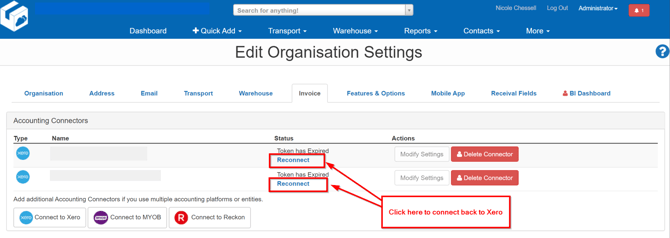
- You will see your list of Accounting Connectors and under the Status column, the ones with expired tokens will read Token has Expired.
- To connect back to the Accounting Connector click Reconnect.
- You will then be prompted to log back into the accounting platform to refresh the token access. This will then reconnect the Accounting Connector and CartonCloud.
If the issue persists after troubleshooting
If after selecting the reconnect button the token still does not refresh you can use the below steps to try and rectify the issue:
- If you don't receive a response from a token refresh you can retry using your existing refresh token for up to 30 minutes.
- If you can't refresh your access token in that time you'll need to send the user through the authorisation flow again to get a code that can be exchanged for new access and refresh token.