
Table of Contents
Purpose
There may be times when you need to update Product properties in bulk. This feature will allow you to update the following fields against a product in bulk,
- Product Type
- Storage Charge Method
- Allow Zero Storage Charge
- Require Weight
- Warning Threshold Days
- Expiry Threshold Days
- Enable Low Stock Notification
- Low Stock Threshold
To make changes to Products in Bulk:
-
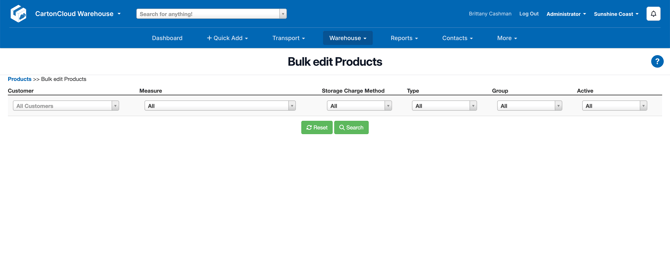
On the Products page select the More button, then select Edit Products in Bulk from the drop-down menu.
-
Once there, you can search using the filters, or just click "Search" to bring up all results
-
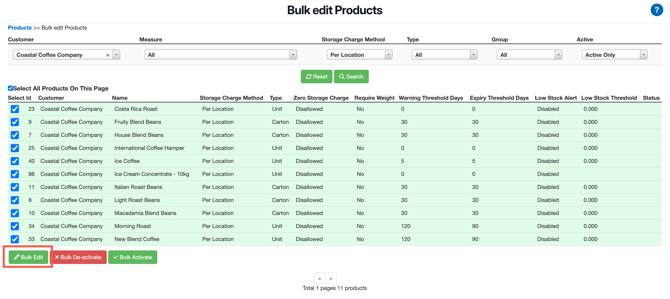
It's important to note that the "Select All Products on this page" checkbox can be used to quickly select all products for changes.
-
Changes can then be made by clicking the Bulk Edit button at the bottom of the page.
-
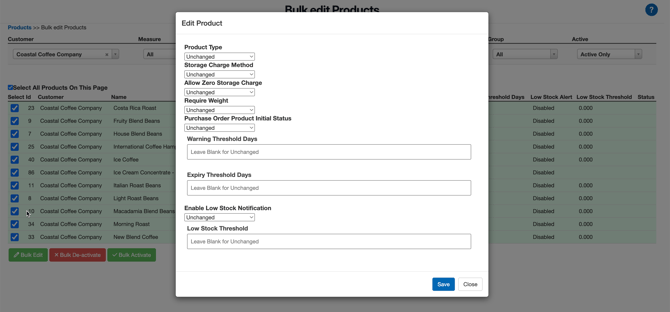
The Editing Box will then appear allowing you to select what to change. Note that by default fields will not be modified - so only make changes to those fields that you want to be modified.
-
Then click Save, and the products you selected will be updated with the new value.