
| Placeholder | Description |
|
$ID$ |
The ID of the Sale Order |
|
$COMPANY_NAME$ |
The name of the Customer |
|
$PICK_DATE$ |
The date the picking completed |
|
$REFERENCE$ |
The Reference for the Sale Order |
|
$ADDRESS$ |
The Delivery Address for the Sale Order |
|
$TELEPHONE$ |
The Delivery Addresses Telephone Number |
|
$PACKING_INSTRUCTIONS$ |
The Packing Instructions |
|
$DELIVERY_INSTRUCTIONS$ |
The Delivery Instructions |
|
$ORGANISATION_NAME$ |
The name of your company, ie: "Roving Logistics". |
|
$SO_DATE_ADDED$ |
Date Added |
|
$SO_STATUS$ |
Sale Order status |
|
$SO_VALUE$ |
Sale Order value |
|
$SO_BARCODE$ |
Sale Order barcode |
|
$CUSTOMER_NAME$ |
The name of the Customer. |
|
$WAREHOUSE_ADDRESS$ $WAREHOUSE_ADDRESS_COUNTRY$ $WAREHOUSE_ADDRESS_STREET$ $WAREHOUSE_ADDRESS_SUBURB$ $WAREHOUSE_ADDRESS_CITY$ $WAREHOUSE_ADDRESS_STATE$ |
The warehouse address where the Sale Order is in. |
|
$DELIVERY_ADDRESS_COUNTRY$ $DELIVERY_ADDRESS_STREET$ $DELIVERY_ADDRESS_STREET_1$ $DELIVERY_ADDRESS_STREET_2$ $DELIVERY_ADDRESS_SUBURB$ $DELIVERY_ADDRESS_CITY$ $DELIVERY_ADDRESS_STATE$ |
Delivery address |
|
$DELIVERY_ADDRESS_CF_X_VALUE$ $DELIVERY_ADDRESS_CF_X_NAME$ |
Delivery address custom field name and value |
|
$DELIVERY_ADDRESS_CONTACT$ |
Delivery address contact |
|
$WAREHOUSE_NAME$ |
The name of the Warehouse the Sale Order is in. |
|
$PALLET_BARCODE$ |
Pallet Barcode |
|
$UOM_BARCODE$ |
The product's unit of measure barcode |
|
$CONSIGNMENT_ID$ |
The ID of the Consignment linked to the Sale Order |
|
$CONSIGNMENT_REFERENCE$ |
The Reference of the Consignment linked to the Sale Order |
|
$CONSIGNMENT_DELIVERY_RUN_NAME$ |
The name of the Delivery Run that the Consignment linked to the Sale Order is allocated to |
|
$CON_BARCODE$ |
Consignment barcode |
|
$CON_TYPE$ |
Consignment type |
|
$CON_DATE_ADDED$ |
Consignment date added |
|
$CON_DATE_DELIVERED$ |
Consignment date delivered |
|
$CON_SPECIAL_INSTRUCTIONS$ |
Consignment special instructions |
|
$CON_CASH_ON_DELIVERY$ |
Consignment cash on delivery |
|
$CON_DELIVERY_RUN_DATE$ |
Consignment delivery run date |
|
$CON_CHARGE_TO$ |
Consignment charge to customer |
|
$CON_PRODUCT_TYPE$ |
Consignment product type |
|
$TOTAL_QUANTITY$ |
Consignment Item total quantity |
|
$TOTAL_PALLETS$ |
Consignment Item total pallets |
|
$TOTAL_SPACES$ |
Consignment Item total spaces |
|
$TOTAL_CUBIC$ |
Consignment Item total cubic |
|
$TOTAL_WEIGHT$ |
Consignment Item total weight |
|
$TOTAL_HOURS$ |
Consignment Item total hours |
|
$TOTAL_HEIGHT$ |
Consignment Item total heigh |
|
$TOTAL_ITEMS$ |
Consignment Item total items |
|
$REQUIRED_SHIP_DATE$ |
Required Ship Date from Sale Order - as specified |
|
$REQUIRED_DELIVERY_DATE$ |
Required Delivery Date from Sale Order |
|
$EXPECTED_DELIVERY_RUN_DATE$ |
The expected date the Sale Order would be shipped from the warehouse. This gets automatically calculated if no $REQUIRED_SHIP_DATE$ is provided upon Sale Order creation. |
|
$EXPECTED_DELIVERY_RUN$ |
The expected Delivery Run name that the Sale Order would be on |
|
$CASH_ON_DELIVERY$ |
Displays either Yes or No depending on whether or not the Sale Order is using Cash On Delivery (COD) |
|
$ATTACH_INVOICE_TO_GOODS$ |
Displays either Yes or No depending on whether or not the Sale Order requires a Customer Invoice to be attached to the goods |
|
$ORDER_URGENT$ |
Displays either Yes or No depending on whether or not the Sale Order is urgent |
|
$QTY_TOTALS$ |
Total quantities, ie: “Cartons: 6 | Pallets: 10” |
|
$SALE_ORDER_CUSTOM_FIELD_1_NAME$ |
Displays the name of Sale Order Custom Field 1. To show the name of Custom Field 2 you would use $SALE_ORDER_CUSTOM_FIELD_2_NAME$ |
|
$SALE_ORDER_CUSTOM_FIELD_10_NAME$ |
There are up to 10 Sale Order Custom Field names that can be shown in the template |
|
$SALE_ORDER_CUSTOM_FIELD_1_VALUE$ |
Displays the value of Sale Order Custom Field 1. To show the value of Custom Field 2 you would use $SALE_ORDER_CUSTOM_FIELD_2_VALUE$ |
|
$SALE_ORDER_CUSTOM_FIELD_10_VALUE$ |
There are up to 10 Sale Order Custom Field values that can be shown on the template |
|
$CONSIGNMENT_CUSTOM_FIELD_1_NAME$ |
Displays the name of the Associated Consignment Custom Field 1. To show the name of Custom Field 2 you would use $CONSIGNMENT_CUSTOM_FIELD_2_NAME$ |
|
$CONSIGNMENT_CUSTOM_FIELD_30_NAME$ |
There are up to 30 Associated Consignment Custom Field names that can be shown in the template |
|
$CONSIGNMENT_CUSTOM_FIELD_1_QTY$ |
Displays the value of the Associated Consignment Custom Field 1. To show the value of Custom Field 2 you would use $CONSIGNMENT_CUSTOM_FIELD_2_QTY$ |
|
$CONSIGNMENT_CUSTOM_FIELD_30_QTY$ |
There are up to 30 Associated Consignment Custom Field values that can be shown in the template |
|
PRODUCT FIELDS: These are Individual product field placeholders which can conflict with Aggregate product field placeholders. |
|
|
$CODE$ |
The Product Code |
|
$NAME$ |
The Products Name |
|
$CUSTOM_FIELD_1$ |
The Purchase Order Products Custom field 1, i.e the Batch number |
|
$CUSTOM_FIELD_2$ |
|
|
$CUSTOM_FIELD_3$ |
|
|
... $CUSTOM_FIELD_10$ |
(there are 10 custom fields in total |
|
$PRODUCT_TYPE$ |
The type of the product, ie: Frozen, Chilled, Ambient etc |
|
$EXPIRY_DATE$ |
|
|
$PRODUCT_STATUS$ |
The status of the product: "OK", "Quarantine", "Damaged" etc. |
|
$LOCATION_NAME$ |
The Warehouse Location Name |
|
$QTY$ |
The quantity of the product, always provided in the Base Unit of Measure |
|
$MEAS$ |
The Unit Of Measure of the Product, as Base. |
|
$PRODUCT_WEIGHT$ |
The Weight for each product. |
|
$SOP_PRODUCT_*XXX*_UOM_QTY$ |
Converts Sale Order base unit of measure quanity to the unit of measure specified. E.g $SOP_PRODUCT_CTN_UOM_QTY$ to show all units in Cartons |
|
$SOP_CF_X_VALUE$ |
Sale Order Product Custom Fields, where X is the number of the Custom Field. |
|
$PRODUCT_CUSTOM_FIELD_1$ |
The Products Custom Field 1, ie: Supplier Code |
|
...$PRODUCT_CUSTOM_FIELD_10$ |
(1, 2 ... 10) |
|
AGGREGATE PRODUCT FIELDS:Please Note a template cannot have conflicting place holders.An Example of this would be if a template had the Individual 'Product Field' of The Product Name ($NAME$) and also used the 'Aggregate Product Field' of the product name ($AGGREGATE_SOP_PRODUCT_NAME$).This would cause a template placeholder error and would not allow the template to be uploaded. |
|
|
$AGGREGATE_SOP_EXPIRY_DATE$ |
Displays the Expiry Date for aggregated Products |
|
$AGGREGATE_SOP_LOCATION$ |
Displays the Warehouse Location for aggregated Products |
|
$AGGREGATE_SOP_EXPIRY_DATE:{format}$, eg: $AGGREGATE_SOP_EXPIRY_DATE:MM-DD-YYYY$ |
Displays the Expiry Date for aggregated Products in the format specified |
|
$AGGREGATE_SOP_PRODUCT_*XXX*_UOM_QTY$ |
Displays the desired unit of measures aggregated. e.g $AGGREGATE_SOP_PRODUCT_PALLET_UOM_QTY$ |
|
$AGGREGATE_SOP_PRODUCT_NAME$ |
Displays the Product Name for aggregated Products |
|
$AGGREGATE_SOP_PRODUCT_DESCRIPTION$ |
Displays the Product Description for aggregated Products |
|
$AGGREGATE_SOP_PRODUCT_QTY$ |
Displays the aggregate quantity of Sale Order Products which are aggregated |
|
$AGGREGATE_SOP_PRODUCT_MEASURE$ |
Displays the Base Unit of Measure for the aggregated Product |
|
$AGGREGATE_SOP_PRODUCT_TYPE$ |
Displays the type of the aggregated product, ie: Frozen, Chilled, Ambient etc. |
|
$AGGREGATE_SOP_PRODUCT_CODE$ |
Displays the Product Code for aggregated Products |
|
$AGGREGATE_SOP_CF_(1-10)_VALUE$ |
Aggregate SOP Custom Fields |
|
$AGGREGATE_PRODUCT_CF_(1-10)_VALUE$ |
Displays the Product Custom Field value for aggregated products. |
|
$AGGREGATE_POP_CF_(1-10)_VALUE$ |
Displays the Purchase Order Product Custom Field value for aggregated products. |
|
$AGGREGATE_PRODUCT_SOP_(1-10)_VALUE$ |
Displays the Sale Order Product Custom Field value for aggregated products. |
|
$AGGREGATE_UOM_BARCODE$ |
To aggregate the product's unit of measure barcodes |
|
$AGGREGATE_PALLET_BARCODE$ |
To aggregate the pallet barcodes |
|
$AGGREGATE_SOP_NET_WEIGHT$ |
Displays the aggregate weight for aggregated products. |
|
$AGGREGATE_SOP_NET_VOLUME$ |
Displays the aggregate volume for aggregated products. |
|
$AGGREGATE_PRODUCT_CF_N_VALUE$ |
Displays the aggregate product custom field value for the group. N is the custom field number. Use the same N as in your $GROUP_BY_PRODUCT_CF_N_VALUE$ tag. |
|
$QTY_TOTAL_SOPS$ |
Sales Order Products total quantity |
|
$SKU_TOTAL$ |
Sales Order total SKU |
|
$NA_ADDRESS$ |
Address in North America address format |
|
$NA_PICKUP_ADDRESS$ |
Pickup Address in North America address format |
|
$NA_DELIVERY_ADDRESS$ |
Delivery Address in North America address format |
|
$NA_ONFORWARDER_ADDRESS$ |
Onforwarder Address in North America address format |
|
$AGGREGATE_POP_CF_(1-10)_VALUE:SUM$ |
This sums up all the aggregated POP custom field numeric values only. If there is a non-numeric value, it will be omitted. |
|
$BASE_UOM_QTY$ |
Displays the quantity of the sale order product using the base unit of measure |
|
$BASE_UOM_MEAS$ |
The base unit of measure code for the sale order product |
|
$OPTIMAL_PICK_UOM_QTY$ |
Displays the quantity of the sale order product using the optimal pick unit of measure |
|
$OPTIMAL_PICK_UOM_MEAS$ |
The optimal pick unit of measure code for the sale order product |
|
$SO_WEIGHT_TOTALS$ |
Sale Order Products total weight |
|
$SO_REQUESTED_SHIPPING_SERVICE$ |
The shipping service selected for the order |
|
$BLOCK_CONSIGNMENTS$ |
Use as a duplication block to render once for each Consignment associated with the Sale Order |
|
$BLOCK_CONSIGNMENTS_ITEMS$ |
Use as a duplication block to render once for each Consignment Item associated with the Sale Order. |
|
$ITEM_LINE_NUMBER$ |
The sequential number of the current item (e.g. 1, 2, 3) |
|
$ITEM_LINE_TOTAL$ |
The total number of items on the order (e.g. 3 if there are 3 cartons) |
|
$ITEM_LINE_NUMBER_PER_CONSIGNMENT$ |
The position of the current item within its own consignment. |
|
$ITEM_LINE_TOTAL_PER_CONSIGNMENT$ |
The total number of items in the current item's consignment. Same value for every row that belongs to that consignment |
Sorting
Within the delivery note you can choose to sort by product code, location, product name, product type, product description and quantity. You can choose to sort by ascending and descending. To add sorting configurations to your template use the below placeholders and place the placeholders above the Product table's headers.
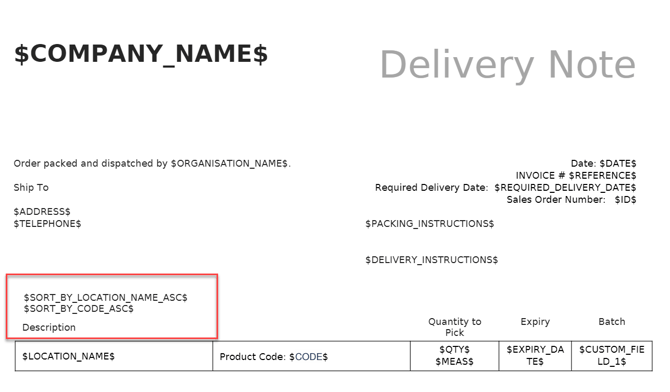
$SORT_BY_{TAG}_{DIRECTION}$
The following values for TAG are supported:
-
CODE (product code)
-
LOCATION_NAME
-
NAME (product name)
-
PRODUCT_TYPE
-
PRODUCT_DESCRIPTION
-
QTY
- PRODUCT_WEIGHT
-
PRODUCT_CF_(1-10),
-
POP_CF_(1-10)
-
SOP_CF_(1-5)
The following values for DIRECTION are supported:
-
ASC
-
DESC
Example: $SORT_BY_PRODUCT_TYPE_ASC$
Grouping
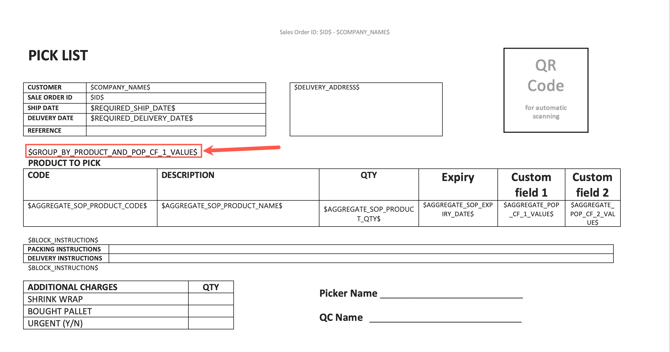
To add grouping configurations to your template, use the below placeholders and place them above the Product table's header as pictured.
|
Placeholder |
Description |
|
$GROUP_BY_PRODUCT_AND_POP_EXPIRY_DATE$ |
Groups SOPs in the table by expiry date only |
|
$GROUP_BY_PRODUCT_AND_POP_EXPIRY_DATE_AND_POP_CF_(1-10)_VALUE$ |
Groups SOPs in the table by expiry date and pop custom field values |
|
$GROUP_BY_PRODUCT_AND_POP_CF_(1-10)_VALUE$ |
Groups SOPs in the table by pop custom field values only |
|
$GROUP_BY_PRODUCT_AND_SOP_CF_(1-10)_VALUE$ |
Groups SOPs in the table by sop custom field values only |
|
$GROUP_BY_PRODUCT_CF_N_VALUE$ |
Groups Sale Order Products by a Product Custom Field value, where N is the number of the product custom field (e.g. |
|
$AGGREGATE_SOP_CF_(1-10)_VALUE$ |
The aggregated value of Custom Field [1–10] across all Sales Order Products on this order. |
|
$AGGREGATE_SOP_CF_(1-10)_VALUE:SUM$ |
This sums up all the aggregated SOP custom field numeric values only. If there is a non-numeric value, it will be omitted. |
|
$AGGREGATE_POP_CF_(1-10)_VALUE:SUM$ |
This sums up all the aggregated POP custom field numeric values only. If there is a non-numeric value, it will be omitted. |
Filtering
| $FILTER_PRODUCT_CF_N_VALUE$ |
Excludes product rows from the document table where Product Custom Field N has no value. Replace N with the number of the product custom field (e.g. |