
| Placeholder | Description |
| $ID$ | The system generated ID of the Consignment |
| $ORGANISATION_NAME$ | Your organisation name in CartonCloud |
| $COMPANY_NAME$ | The name of the Customer that the Consignment is for |
| $REFERENCE$ | The customer reference of the Consignment |
| $CON_TYPE$ | Consignment type |
| $CON_DATE_ADDED$ | The date the Consignment was added |
| $CON_DATE_DELIVERED$ | The date the Consignment was delivered |
| $CON_CHARGE_TO$ | The Consignment charge to customer |
| $CON_VALUE$ | Value of the Consignment |
| $BARCODE$ | The barcode number of the Consignment |
| $DATE_ADDED$ | The date the Consignment was added to CartonCloud |
| $PICKUP_ADDRESS$ | The pickup address of the Consignment |
| $PICKUP_ADDRESS_STREET_2$ | The second line of the pickup address (e.g suite, apartment number) |
| $DELIVERY_ADDRESS$ | The delivery address of the Consignment |
| $DELIVERY_ADDRESS_STREET_2$ | The second line of the delivery address (e.g suite, apartment number) |
| $DELIVERY_ADDRESS_STREET_2$ | The second line of the delivery address |
| $ADDRESS$ |
The pickup, delivery and onforwarder address of the Consignment will show. It is suggested that you also include the address type placeholder next to the address, so you know what each address is. The placeholders should also be formatted in a table. See below for how the placeholders should be formatted. $ADDRESS_TYPE$ $ADDRESS$ |
| $DELIVERY_RUN_NAME$ | The name of the Delivery Run that the Consignment is assigned to |
| $DELIVERY_RUN_DATE$ | The date the Consignment will be delivered |
| $SPECIAL_INSTRUCTIONS$ | The special instructions for the Consignment |
| $COD_VALUE$ | The Cash On Delivery value of the Consignment if applicable |
| $PRODUCT_TYPE$ | The Product Type that the Consignment is for |
|
$DATE$ |
The current date |
|
$FROM_COMPANY$ |
The sending Company of the Consignment |
|
$FROM_STREET$ |
The street address of the sending Company |
| $FROM_STATE$ | The state of the sending Company |
| $FROM_CODE$ | The postcode of the sending Company |
| $FROM_PHONE$ | The Phone number of the sending Company |
| $TO_COMPANY$ | The receiving Company of the Consignment |
| $TO_STREET$ | The street address of the receiving Company |
| $TO_STATE$ | The state of the receiving Company |
| $TO_CODE$ | The postcode of the receiving Company |
| $TO_PHONE$ | The Phone number of the receiving Company |
| $FIELD_1$ | The field name of Consignment Custom Field 1. (eg Cartons). To show Custom Field 2 you would use $FIELD_2$. (this would show Pallets for example). There are up to 30 Consignment custom fields that can be shown on the template if the fields have been created |
| $FIELD_1_VAL$ | The value of Consignment Custom Field 1 (eg the number of cartons on the Consignment). To show the value of Custom Field 2 you would use $FIELD_2_VAL$. This would show the value of pallets for example. There are up to 30 Consignment custom fields that can be shown on the template if the fields have been created. |
| $DATA_FIELD_[uppercase_map_field_name goes here]$ | The field name of Consignment Data Custom Field. The map field name needs to be inserted, (eg WEIGHT). If your map field name is the weight. Any spaces in the map field name will be replaced with no space, for example, a map field of "kg weight" should be loaded in here as KGWEIGHT. Ie: $DATA_FIELD_KGWEIGHT$ |
| $DATA_FIELD_[uppercase_map_field_name goes here]_VAL$ | The field value of Consignment Data Custom Field. (eg WEIGHT). If your map field name is WEIGHT. If your map field name is the weight. Any spaces in the map field name will be replaced with no space, for example, a map field of "kg weight" should be loaded in here as KGWEIGHT. Ie: $DATA_FIELD_KGWEIGHT_VAL$ |
| $SOP_CUSTOM_FIELD_1$ | Custom Fields from Sale Order products, e.g. Custom Field 1 could be Batch for example. Whatever has been added to the customer Purchase Order Products for these custom fields. Use SOP_CUSTOM_FIELD_2 for next field etc etc. |
| $SO_REFERENCE$ | The Sale Order reference |
| $SO_STATUS$ | The status of the Sale Order |
| $SO_FINISH_PACK_TIME$ | Sale Order finish pack time |
| $SO_DATE_ADDED$ | The date the Sale Order was added |
| $SO_PACKING_INSTRUCTIONS$ | The Sale Order packing instructions |
| $SO_VALUE$ | The value of the Sale Order |
| $SOP_CF_X_VALUE$ | SOP Custom Field value for the associated Sale Order with the Consignment. |
| $DRIVER$ | Name of the driver on Run Sheet associated with the consignment. |
| $VEHICLE$ | Name of vehicle on Run Sheet associated with the consignment. |
| $REQUIRED_SHIP_DATE$ | Required Ship date from Associated Sale Order |
|
$CONSIGNMENT_REQUIRED_DELIVERY_DATE$ |
Required Delivery Date from Consignment |
|
$CONSIGNMENT_STATUS$ |
Status of the consignment |
| $SALEORDER_REQUIRED_DELIVERY_DATE$ | Required Delivery Date from Associated Sale Order |
| $SALE_ORDER_URGENT$ | Displays either a Yes or No depending on whether the Associated Sale Order is urgent |
| $ATTACH_INVOICE_TO_GOODS$ | Displays either a Yes or No depending on whether the Associated Sale Order requires a Customer Invoice to be attached to the goods |
| $SALE_ORDER_CUSTOM_FIELD_1_NAME$ | Displays the name of Associated Sale Order Custom Field 1. To show the name of Custom Field 2 you would use $SALE_ORDER_CUSTOM_FIELD_2_NAME$ |
| $SALE_ORDER_CUSTOM_FIELD_10_NAME$ | There are up to 10 Associated Sale Order Custom Field names that can be shown in the template |
| $SALE_ORDER_CUSTOM_FIELD_1_VALUE$ | Displays the value of Associated Sale Order Custom Field 1. To show the value of Custom Field 2 you would use $SALE_ORDER_CUSTOM_FIELD_2_VALUE$ |
| $SALE_ORDER_CUSTOM_FIELD_10_VALUE$ | There are up to 10 Associated Sale Order Custom Field values that can be shown on the template |
| $RUN_SHEET_NAME$ | Run Sheet Name |
| $RUN_SHEET_ID$ | Run Sheet ID |
| $CON_PALLET_ID$ | The Consignment Pallet ID |
| $CON_ORDER_ID$ | The Consignment ID |
| $SO_ID$ | The Sale Order ID |
| $WAREHOUSE_NAME$ | Name of the warehouse |
| $WAREHOUSE_ADDRESS$ | Address of the warehouse |
| $NA_ADDRESS$ | Address in North America address format |
| $NA_PICKUP_ADDRESS$ | Pickup Address in North America address format |
| $NA_DELIVERY_ADDRESS$ | Delivery Address in North America address format |
| $NA_ONFORWARDER_ADDRESS$ | Onforwarder Address in North America address format |
|
$TOTAL_PALLETS$ $TOTAL_SPACES$ $TOTAL_QUANTITY$ $TOTAL_CUBIC$ $TOTAL_WEIGHT$ $TOTAL_HOURS$ $TOTAL_DISTANCE$ $CON_QTY_TOTAL_SUMMARY$ |
Consignment Totals |
ONFORWARDER ADDRESS |
$ONFORWARDER_ADDRESS$ = Complete Onforwarder Address
$ONFORWARDER_ADDRESS_COMPANY$ = Onforwarder Address company name. If Consignment has onforwarder address will replace tag with string: 'VIA ONFORWARDER'Fcon |
| PRODUCT FIELDS: |
Values of Products from Associated SaleOrder $PRODUCT_CUSTOM_FIELD_(1-10)_NAME$: $PRODUCT_CUSTOM_FIELD_(1-10)$ = Displays the name of Product Custom Field 1. To show the name of Custom Field 2 you would use $PRODUCT_CUSTOM_FIELD_2_NAME$ |
| AGGREGATE PRODUCT FIELDS: |
Please Note a template cannot have conflicting place holders. An Example of this would be if a template had the Individual 'Product Field' of The Product Name ($NAME$) and also used the 'Aggregate Product Field' of the product name ($AGGREGATE_SOP_PRODUCT_NAME$). This would cause a template placeholder error and would not allow template to be uploaded. $AGGREGATE_SOP_PRODUCT_TYPE$ = Displays the type of the aggregated product, ie: Frozen, Chilled, Ambient etc. $AGGREGATE_SOP_PRODUCT_MEASURE$ = Displays the Base Unit of Measure for the aggregated Product $AGGREGATE_SOP_PRODUCT_DESCRIPTION$ = Displays the Product Description for aggregated Products $AGGREGATE_PRODUCT_CF_(1-10)_VALUE:SUM$ = This sums up all the aggregated POP custom field numeric values only. If there is a non-numeric value, it will be omitted. $AGGREGATE_SOP_NET_WEIGHT$ = Displays the aggregate weight for aggregated products. $AGGREGATE_SOP_NET_VOLUME$ = Displays the aggregate volume for aggregated products. $AGGREGATE_PRODUCT_CF_N_VALUE$ = Displays the aggregate product custom field value for the group. N is the custom field number. Use the same N as in your |
| CONSIGNMENT ITEM FIELDS |
Value of the linked Consignment Items $TOTAL_{CF_MAP_FIELD_NAME}$ = The total of the Consignment Item custom field. The MAP_FIELD_NAME is the name of the Custom Field, for example, $TOTAL_CHEP$. The value of Item Custom Field stored against the Item. The map field name needs to be inserted, (eg BATCH). If your map field name is batch then the replacement tag would be $ITEM_BATCH$ |
Date Format
To change the date format on any document template, you need to add a date suffix the date placeholder. This will look something like this:
$EXPIRY_DATE:DD-MM-YYYY$
Different formats can be used on the same document template for different placeholders. Remember to add the colon between the date placeholder and date format.
These are the current accepted date formats:
| Suffix | Example of Date |
| DD-MM-YYYY |
22/03/2019 |
| DD-MM-YY | 22/03/19 |
| MM-DD-YYYY | 03/22/2019 |
| MM-DD-YY | 03/22/19 |
Customising Barcodes
With the Consignment Label, you have greater flexibility when creating barcodes on your Document Template. This includes:
- Adding a fixed value(s) to the barcode
- Adding multiple Document Placeholders to the barcode, for example, $TO_CODE$ (The postcode of the receiving Company).
- Adding formatting placeholders:
- $PAGE$ - the page number of the total number of consignment labels printed in one instance
- $PAGES$ - the total number of consignment labels printed in one instance
- You can add padding characters to the above placeholders such as, 'PAGE0L3', where 03L:
- 0 is the padding character
- L or R is left or right padding
- 3 in the total number of characters that the placeholder should be padded to
An example of this type of barcode includes:
CI2015CTNCLD0000000057001004
- C1 is a fixed value
- 2015 is the delivery post code
- CTNCLD0000000057 is the barcode
- 001 is the PAGE number left padded with 0 to 3 characters
- 004 is the total PAGES left padded with 0 to 3 characters
This is achieved in the Document Template with the following:
${CI}TO_CODE|BARCODE|PAGE0L3|PAGES0L3:BC128$
- The whole barcode value is enclosed in $$
- Fixed values enclosed in {}
- and Placeholder names are separated by |
Grouping
To add grouping configurations to your template, use the below placeholders and place them above the Product table's header as pictured.
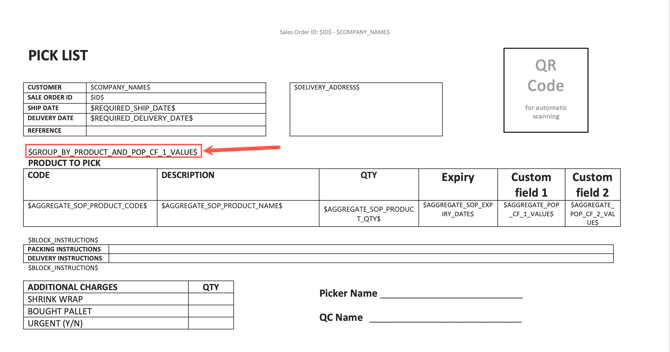
|
Placeholder |
Description |
|
$GROUP_BY_PRODUCT_AND_POP_EXPIRY_DATE$ |
Groups SOPs in the table by expiry date only |
|
$GROUP_BY_PRODUCT_AND_POP_EXPIRY_DATE_AND_POP_CF_(1-10)_VALUE$ |
Groups SOPs in the table by expiry date and pop custom field values |
|
$GROUP_BY_PRODUCT_AND_POP_CF_(1-10)_VALUE$ |
Groups SOPs in the table by pop custom field values only |
|
$AGGREGATE_PRODUCT_CF_(1-10)_VALUE:SUM$ |
This sums up all the aggregated POP custom field numeric values only. If there is a non-numeric value, it will be omitted. |
|
$GROUP_BY_PRODUCT_CF_N_VALUE$ |
Groups Sale Order Products by a Product Custom Field value, where N is the number of the product custom field (e.g. |
Filtering
| $FILTER_PRODUCT_CF_N_VALUE$ |
Excludes product rows from the document table where Product Custom Field N has no value. Replace N with the number of the product custom field (e.g. |