
Table of Contents
Purpose
To select the day and frequency in which a Delivery Run runs each week.Use cases
If you have Delivery Runs that:
- Don't run every day
- Runs on specific days
- Has a particular schedule each week which changes week to week
How to create a schedule for a Delivery Run
- Navigate to the Delivery Runs page, Transport>Delivery Runs.
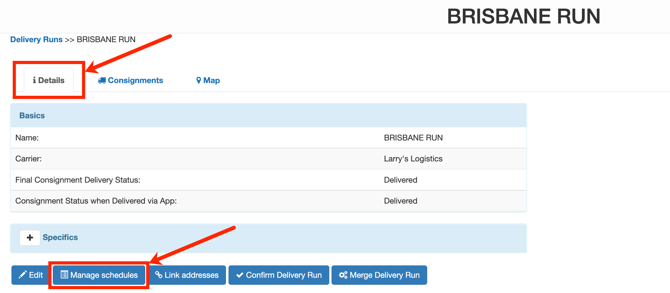
- Click on the relevant Delivery Run.
- Select the Details tab.
- Click Manage schedules.
- Click +Add.

- Enter a Name
- Use the tick boxes to select the days of the week you wish the Delivery Run to run.
- The start date will be set as the last Sunday of the week.
- Select the interval of weeks you wish the schedule to run. For example, if you enter 1, it will run every week; if you enter 2, it will run every 2nd week.
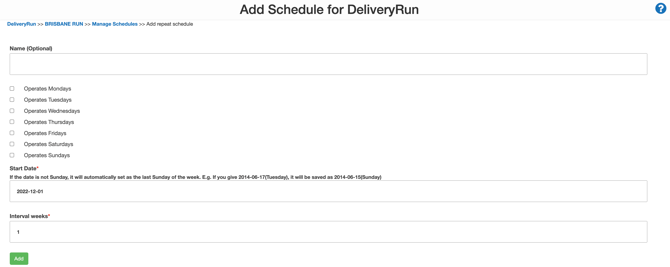
- Click Add.
Note that if you want to overwrite a Schedule set for a previous period, you will want to delete the old Schedules.
Examples
If you want to run the Brisbane Run every weekday apart from Thursday.