Table of Contents
Purpose
This feature allows customers to have their bills generated automatically over a period of time. If this feature is enabled, CartonCloud checks for Consignments that match the rules specified by the supplier and automatically generates bills for supplier each day. This removes the need for CartonCloud customers to manually create bills on a day-to-day basis
CartonCloud contains supplier-specific settings which are applied to newly created suppliers.
How to steps
- Go to Contacts from the top menu and click on Suppliers.
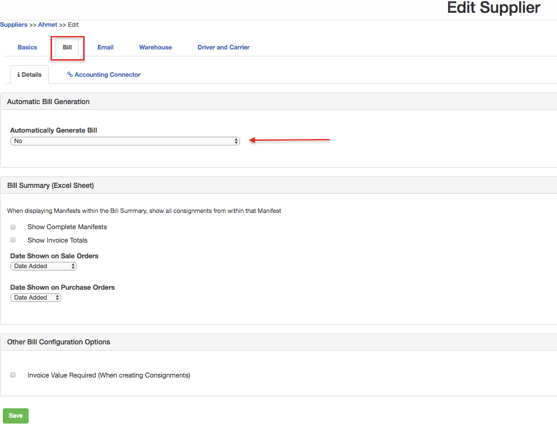
- A page will open listing all the available suppliers. Click on the supplier for whom the bills are to be generated automatically. A page open showing the details of the supplier. Click on Edit button at the bottom left-hand side of the screen. Click on Bill tab from the page that opens up.
- Under the details tab, set the Bill settings for the supplier. Based on the settings specified in this section, bills will automatically generate for the supplier