Table of Contents
- Purpose
- Duplicate the consignment
- Manually add additional charge(s)
- Add an adhoc charge for attempted delivery
Purpose
If you attempt to perform a delivery which is unsuccessful, and you wish to charge the client for the delivery, plus a potential redelivery (so the charges are applied twice), there are three ways to achieve this:
Duplicate the Consignment
By duplicating the Consignment, you create two jobs which are billable. We recommend duplicating the consignment if you're performing a delivery and need to charge both the original job and the new job.
Duplicating a Consignment can be done from the Duplicate Button within the View Consignment screen: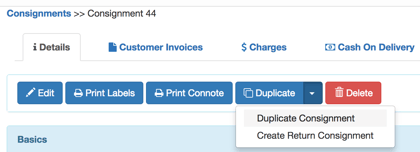
The, mark the original consignment as "Reissued".
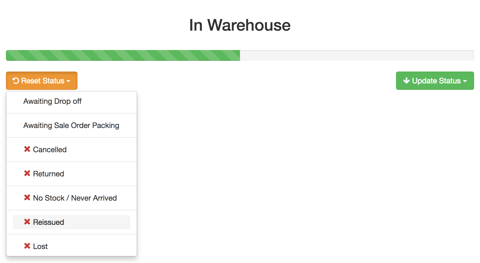
The new consignment you have created can now be allocated to a driver as per normal, and both jobs will be charged.
Manually Add Additional Charge(s)
You can also manually add charges to a consignment from the Charges Tab within the Consignment. 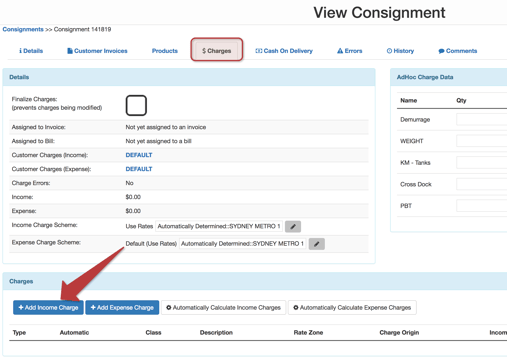
Add an Adhoc Charge for Attempted Delivery
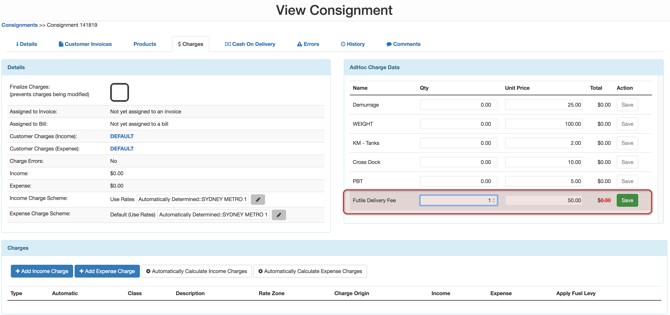
If you have a standard fee you apply for attempting a delivery, you can simply add a new Adhoc Charge, and give it a descriptive name, such as "Futile Delivery Fee", you can then simply reallocate the original consignment. This adhoc charge will then be applied in addition to the standard Consignment Rates.