
Table of Contents
Purpose
To remove a Consignment from one Delivery Run and move it to another. If you change the Consignment address, you can allow CartonCloud to redetermine the Delivery Run using the new address automatically.
How to reallocate a consignment
You can reallocate a Consignment to a Delivery Run either automatically or manually.
Automatically reallocate a Consignment
CartonCloud can automatically redetermine the Delivery Run of a Consignment when you change the delivery address.
-
Navigate to the Consignments page, Transport>Consignments.
-
Select the individual Consignment.
-
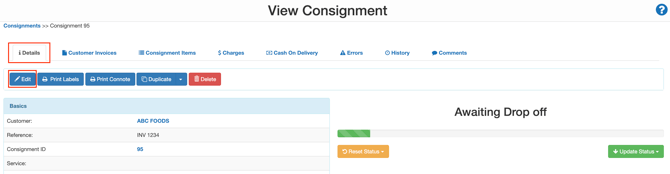
Select the Edit button within the Details tab.
-
Change the Delivery Address. Upon changing the address, the Redetermine Delivery option will appear at the bottom of the screen.
-
Select Yes.
-
Select Save.
CartonCloud will automatically redetermine the Delivery Run using the new address. The Driver and Run Sheet will remain unchanged.
Manually reallocate a Consignment
You can reallocate a Consignment to a Delivery Run manually, either individually or in bulk.
Reallocating an individual Consignment
-
Navigate to the Consignments page, Transport>Consignments.
-
Select the individual Consignment.
-
Within the Details tab, navigate down to the Allocated to Delivery Run field.
-
Select Move.
-
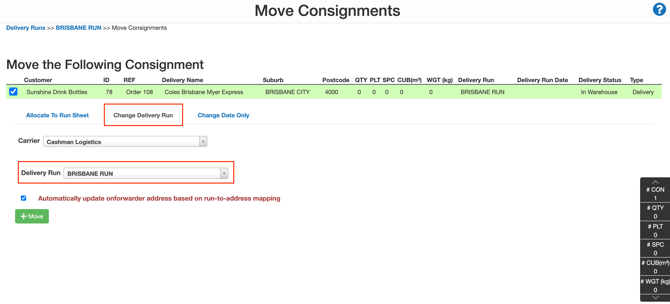
Select the Change Delivery Run tab.
-
Using the Delivery Run drop-down menu, select the Delivery Run you wish to add the Consignment to.
-
Select Move.
The Driver and Run Sheet will remain unchanged.
Reallocating Consignments in bulk
-
Navigate to the Consignment page, Transport>Consignments.
-
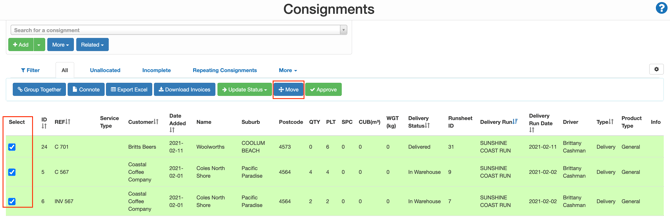
Select the Consignments you wish to move by ticking the select box.
-
Select Move.
-
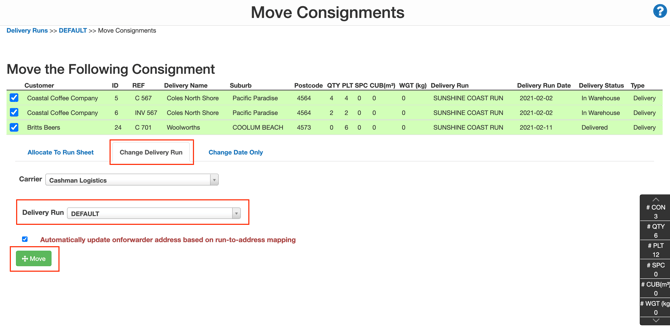
Select the Change Delivery Run tab.
-
Using the Delivery Run drop-down menu, select the Delivery Run you wish to add the Consignment to.
-
Click Move.
The Driver and Run Sheet will remain unchanged.