
Login Options
There are multiple login options to access CartonCloud. These options include:
- Standard email and password
- SSO (WMS Premium feature only)
- Social login
SSO
Please note this is a WMS Premium only feature. For more information on WMS Premium and to upgrade your account please reach out to our Service Desk team here.
Enterprise Single Sign-On (SSO) is the ability for users to log in with one set of credentials to get access to multiple corporate apps, data and websites which they have permission for. Enterprise Single Sign-On helps to strengthen security and compliance.
For more information on SSO, please see here.
Social Login
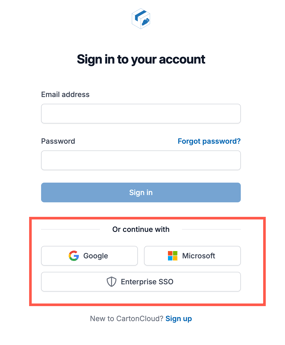
You can log into CartonCloud using your Google or Microsoft account. This is useful if you wish to avoid having to create another set of login credentials and use existing ones.
To log in via Google or Microsoft:
- Click the Google or Microsoft login button on the login screen.
- If your Google or Microsoft account matches an existing CartonCloud user, you will be logged in instantly.
Points to consider:
- You still need to be invited as a user to CartonCloud to log in.
- Ensure the email you are using for your social account is the same email utilised for your CartonCloud user invite.
- If you log in with your Google account, you can no longer use your CartonCloud email and password. You will always have to use your Google login.