
Table of Contents
Purpose
There are times when it is not possible to collect a signature at delivery, this provides flexibility to the driver to be able to deliver without a signature.
When enabled this will allow for special instructions to be added to the consignments details to let the driver know they have the Authority to leave the delivery without receiving a signature. They will still be required to record where they left the delivery and take a photo of the delivery for the POD.
Authority to Leave is a Customer level setting, so you will need to enable this for any Customer you wish to use it with.
How to set-up
- Navigate to your Customers page > Click Edit
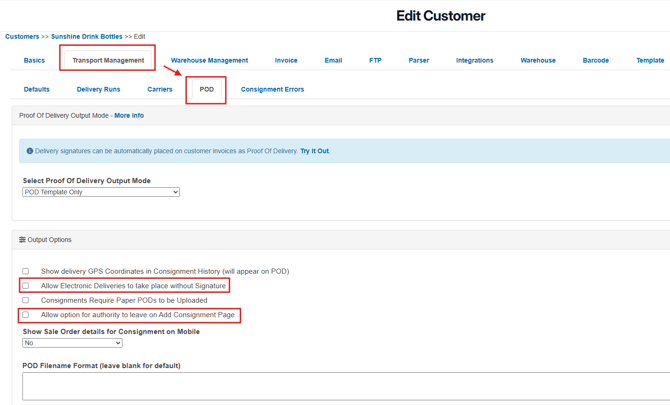
- Select the Transport Management Tab > POD tab
- Check to enable "Allow option for authority to leave on Add Consignment Page" This will add the option on the add consignment page to select "Yes" and will then allow for the driver instructions to be added. Further information on the settings can be found in our Knowledge article here.
- Check to enable "Allow Electronic Deliveries to take place without Signature". This is required for the driver to be able to mark the order as delivered with no signature. Further information on the settings can be found in our Knowledge article here.
How to use
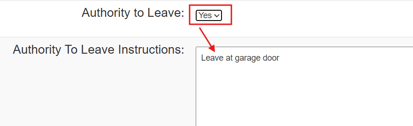
- Once enabled you will see an option for "Authority to Leave" on the "Add Consignment" page and when set to "Yes" you will be able to enter in further instructions for the driver.
- Once you have selected "Yes" and added the instructions for the driver, these will be visible on their Mobile Delivery App.
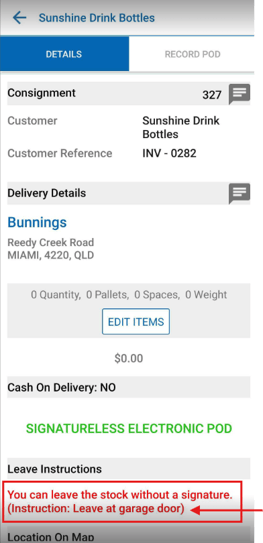
- The Driver can then go ahead and record their POD, further instructions on how to record a signatureless POD can be found here.