Table of Contents
Purpose
Both Android and iOS require the user to give permissions to the CartonCloud app to access certain information and device functionality.
Permissions
Required Permissions
|
Description |
Android |
iOS |
|
|
Location |
Location is required to submit a driver's location while using the app and on completing actions in the app, e.g. submitting a POD. |
Initial access granted automatically on install. (Android versions prior to 6.0) |
Requested once, on initial launch of the app. |
|
Camera |
CartonCloud requires access to the device's camera to upload Invoice Photos and include photos for Errors and PODs. |
Initial access granted automatically on install. (Android versions prior to 6.0) |
Requested once, the first time access to camera is required. |
|
Photos / Device Storage |
In addition to taking photos with the device's camera, the user can also choose to use a photo already on their device. |
Initial access granted automatically on install. (Android versions prior to 6.0) |
Requested once, the first time access to photos is required. |
|
Notifications |
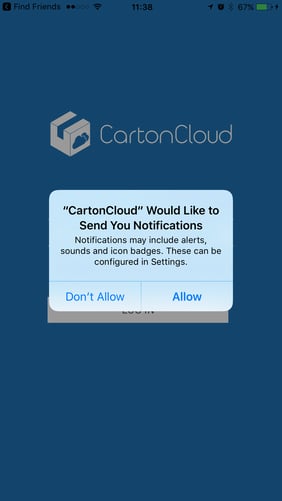
Notifications need to be enabled for the CartonCloud app to receive Push Notifications from the web app. |
Initial access granted automatically on install. |
Requested once, on initial launch of the app. |
Android-Only
|
Description |
Android |
|
|
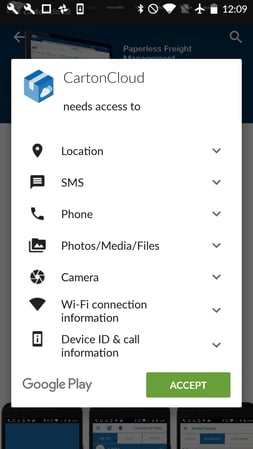
Send SMS |
Provided as an option to contact customers in Consignment Detail View if contact information has been provided. |
Initial access granted automatically on install. |
|
Call Phone |
Provided as an option to contact customers in Consignment Detail View if contact information has been provided. |
Initial access granted automatically on install. |
iOS-Only
|
Description |
iOS |
|
|
Background App Refresh |
The CartonCloud app continues certain operations while in the background e.g. checking the user's "Clock On" status with the server to ensure Push Notifications are sent correctly. |
Initial access granted automatically on install. |
Changing Permissions
Users may change permissions given to the CartonCloud app at any stage, by modifying the app settings on their device.
Android
Permissions can be modified in Settings > Apps > CartonCloud > Permissions on devices that allow users to manage permissions. This is only possibly on devices running Android 6.0 (Marshmallow) and up.
Notification settings are handled separately in some newer versions of Android though and can be tuned in more fine-grain detail in Settings > Notifications > App Notifications > CartonCloud, as well as just switching them on or off in the app permission settings.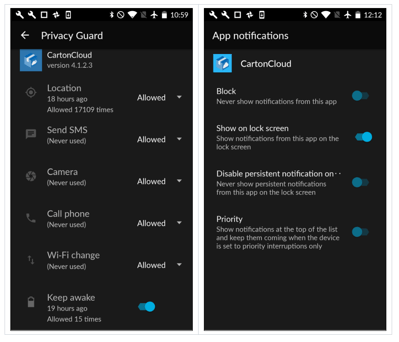
iOS
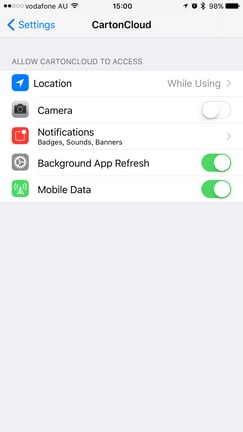
All CartonCloud app related permissions can be modified in Settings > CartonCloud.