Table of Contents
Purpose
When perishable goods come into the Warehouse in the form of a Purchase Order they are given an expiry date. This expiry date is then used by CartonCloud to determine whether or not it can be packed as part of a Sale Order. By default, expired stock is not allowed to be used for packing Sale Orders. However, should a Customer wish to allow expired stock to be sent out, then a per-customer setting exists to enable this functionality. When this setting is enabled any available stock in the Warehouse, be it expired or not, can be used to pack a Sale Order.
Enabling expired stock use in sale orders
To enable the use of Expired Stock in Sale Orders:
- Navigate to the Customers page, Contacts > Customers.
- Select the relevant Customer.
- Click Edit.
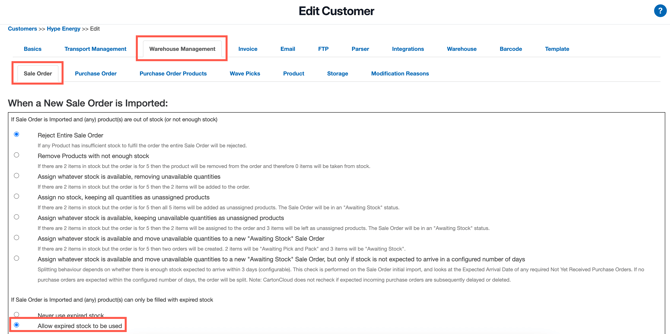
- Select the Warehouse Management > Sale Order tab.
- Against If Sale Order is imported any (any) product(s) can only be filled with expired stock check Allow expired stock to be used