
How to steps
- To add consignments to a bill, first navigate to the Bill you wish to add to by selecting More, then selecting Bills in the drop-down menu.
- Next, click on the Consignments tab at the top of the page. Then click Add Consignments button.
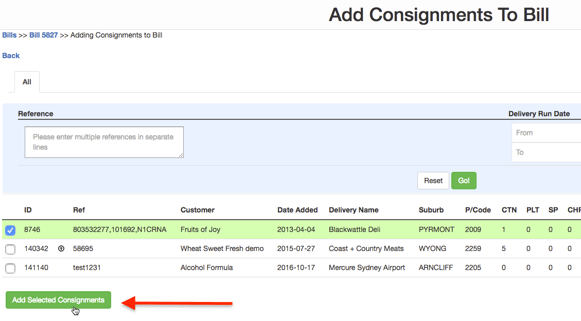
- The next page will display all the consignments related to the Supplier of the bill that are not billed. Options are provided to filter the consignments based on:
- Reference (Consignment Reference): Filter based on consignment reference. Enter each reference in separate lines.
- Delivery Runs Date: Select the From and To date to filter consignments based on delivery run dates.
- From the list of displayed consignments select Consignments that are to be added to the Bill and click on Add Selected Consignments button.
- The consignments will now be added to the bill.