Table of Contents
- What are Storage Charges
- Storage Charge Methods
- Storage Charge Rate Type
- How Storage Charges are calculated based on Storage Periods
- How modifying in and out dates impact Storage Charges
What are Storage Charges
Storage Charges apply to stock that is in the warehouse and allocated to a warehouse location. Charges will automatically calculate and added to invoices.
Storage Charges incur for the entire storage period. So, for example, if a pallet is only in the warehouse for 1 hour, it will still be charged for 1 week of storage. In addition, for 'partial' products, storage is never reduced.
Storage Charge Methods
See here for descriptions of each different Storage Charge method.
Storage Charge Rate Type
Flat Rate
A single fixed fee
Sliding Scale
Sliding scale rates allow you to apply varying storage charges depending on the volume stored within your warehouse.
For example, you may charge the first 10 pallets at $5.00 each and then $4.50 for each after that. (Cumulative Sliding Scale)
Or, you may charge $50 if the client stores 10 pallets, but then drop the rate to just $4.50 per pallet for all after (Non-Cumulative Sliding Scale).
Selecting Sliding Scale allows you to configure such rates in bands.
Sliding Scale Rates allow you to apply varying rates depending on the quantity of a particular item (for simplicity, we'll refer to Pallets throughout the rest of the guide; however, this could be anything - cartons, skids, drums).
It's imperative to understand the subtle but potentially enormous pricing differences between Non-Cumulative and Cumulative pricing.
Non-Cumulative
Non-Cumulative means that a single price will be applied to all pallets
For example, you may charge weekly storage per location in the following way:
|
Pallets |
Price |
| 1 -2 |
$5.00 / per pallet |
|
3-5 |
$4.50 / per pallet |
|
6-10 |
$4.00 / per pallet |
|
11+ |
$3.80 / per pallet |
Meaning that 6 pallets would simply cost: 6 x $4.00 = $24.00.
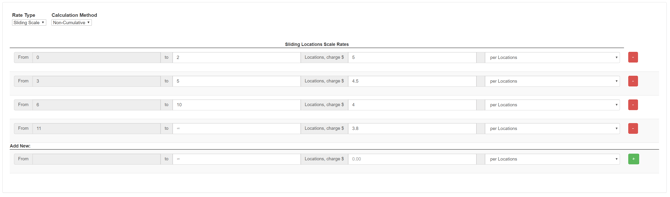
This can be implemented in CartonCloud using a Non-Cumulative Sliding Scale:
Cumulative
Cumulative means that various prices will be applied to the pallets within the scale.
For example, you may charge weekly storage per location in the following way:
|
Pallets |
Price |
|
1-2 |
$5.00 / per pallet |
|
3-5 |
$4.50 / per pallet for every pallet after the 2nd |
|
6-10 |
$4.00 / per pallet for every pallet after the 5th |
|
11+ |
$3.80 / per pallet for every pallet after the 10th |
Meaning that 6 pallets would cost: (2 x $5.00) + (3 x $4.50) + (1 x $4.00) = $27.50.
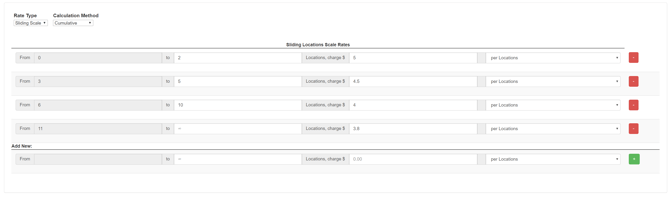
This can be implemented in CartonCloud using a Cumulative Sliding Scale:
How sliding scale is applied for each storage charging method:
|
Storage Charge Method |
How sliding scale is applied |
|
Per Location |
Per Product Type |
|
Per Pallet (based on qty) |
Per Product Type |
|
Volume and Weight |
Per Product |
|
Per Unit of Measure |
It depends on the aggregation setting on the Product/Customer Charge |
Per Unit of Measure Charging Method specific Rate Types
Round up to next (larger) Unit of Measure
When using this Rate Type, you need to ensure there is a charge in place for the Product Unit of Measure you are rounding up to.
The below examples assume we have a product in which 6 bottles = 1 case.
It is assumed we have a charge for Bottles configured to Round up to next (larger) Unit of Measure (cases)
|
Location |
Storage Quantity |
Aggregate by SKU by location |
Aggregate by SKU across the entire warehouse |
|
AA-01-01 |
5 bottles |
Combine 7 bottles together (5+2) which converts to 1 Bottle + 1 Case Round up 1 bottle + 1 case to 2 cases Charge 2 cases |
Combine 12 bottles together (5+2+5), which converts to 2 cases. Charge 2 Cases |
|
AA-01-01 |
2 bottles |
|
|
|
AA-01-04 |
5 bottles |
Round up 5 bottles to 1 case Charge 1 case |
|
|
Total Charge |
|
3 cases |
2 cases |
Round down to previous (smaller) Unit of Measure
When using this Rate Type, you need to ensure there is a charge in place for the Product Unit of Measure you are rounding down to.
The below examples assume we have a product in which 6 bottles = 1 case.
It is assumed we have a charge for Cases configured to Round down to previous (smaller) Unit of Measure (bottles)
|
Location |
Storage Quantity |
Aggregate by SKU by location |
Aggregate by SKU across the entire warehouse |
|
AA-01-01 |
5 bottles |
Combine 7 bottles together (5+2) which converts to 1 Bottle + 1 Case Round down 1 bottle + 1 case to 7 bottles Charge 7 bottles |
Combine 12 bottles together (5+2+5), which converts to 2 cases. Round down 2 cases to 12 bottles Charge 12 bottles |
|
AA-01-01 |
2 bottles |
|
|
|
AA-01-04 |
5 bottles |
Charge 5 Bottles |
|
|
Total Charge |
|
12 bottles |
12 bottles |
How Storage Charges are calculated utilising Storage Periods
CartonCloud will combine existing storage and new storage to calculate the Invoice Periods Storage Charges.
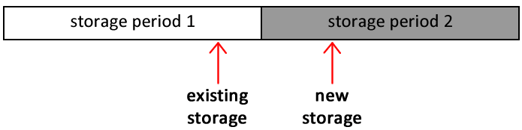
Existing storage: is the stock already on hand at the start of the storage period (the date allocated is before the storage period start date).
New storage: all the inbound stock that falls within the storage period (date allocated is within the storage period range).
The following diagram shows two storage periods, Storage Period 1 and Storage Period 2.
Assuming we're calculating storage charges on Storage Period 2, the Purchase Order Products which were allocated to locations before Storage Period 2 are charged as Existing Storage (as they were already in the warehouse when the Storage Period began), and the Purchase Order Products allocated during Storage Period 2 are charged as New Storage.
How modifying in and out dates impacts Storage Charges
CartonCloud allows you to make retrospective changes to the Purchase Order Allocated Dates and Sale Order Packed / Dispatched Dates.
Doing so will affect storage charges for Storage Periods that fall within the dates changed. Typically, this will only affect Storage Periods which have not yet been invoiced. However, Storage Periods which have already been invoiced can be manually "Recalculated" for the updated charges to be calculated.
Example:
We have weekly Storage Periods which run Monday → Sunday.
Invoicing is done on a Monday morning for the previous week.
On Friday, a Purchase Order is received and verified; however, for some reason, CartonCloud is not updated at the time. Come Monday, and the Purchase Order is verified within CartonCloud; however, to capture the Storage Charges from the previous week, the Allocated Date is updated to the previous Friday.
In this situation, there is now a Storage Period that has been affected (the previous week); however, this Storage Period has already been invoiced. Therefore, for it to be updated to reflect the new charges, it needs to be recalculated.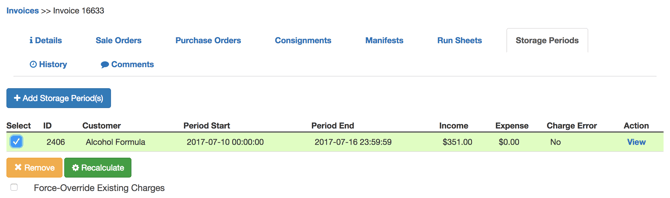
Once this has been done, the Storage Period will reflect the new charges based on the stock that has arrived on Friday.
Split Month Storage Billing
If you charge your customers monthly for storage you have the option of enabling split month storage billing. This allows you to offer a discounted rate for stock that comes in later in the first month of the stock being in the warehouse or for stock that leaves the warehouse early in its last month of storage. You have the ability to choose where the month is split and how much of a discount you wish to offer your customer.
For example, if you choose to split the month on the 15th of every month and a discount of 15%, for any stock that comes into a warehouse location late after the 15th will receive a discounted rate of 15% off their storage rates. Or if you choose to split the month on the 10th of every month and a discount of 5% for any stock that leaves early in its last month of storage, any stock that leaves before the 10th of its last month of storage will receive a discounted rate of 5% off their storage rates.
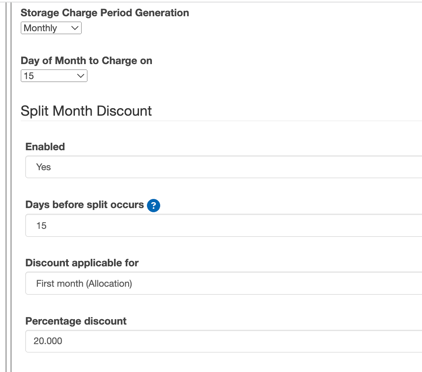
This can be configured from within the Rate Card and at the Organisation Settings level. If configured at the Organisation Settings, the settings will be automatically applied to any new rate card created. If the settings are configured at the rate card level, they will only apply to that particular rate card.
- Navigate to the relevant Rate Card, More>Rate Card.
- Select Edit against the Rate Card.
- Scroll down to Storage Period Generation.
- For Storage Period Generation select Monthly.
- Fill in the following fields:
- Day of month to charge on: day of the month to charge on
- Split Month Discount: select enabled
- Days before split occurs: the number of days into the storage period after which the split should occur. This will define when stock is considered in the split period and the discount is applied. For example, if you set the days to 20, any stock that comes in after 20 days of the month will be considered in the second split period and receive the percentage discount off the storage rates.
- Discount applied for:
- First month (allocation) - this will be applied for stock that arrives late in the first month. (only applicable if using per pallet or per location storage charge method)
- Last month (depletion) - this will be applied for stock that leaves early in its last month of storage (only applicable if using per location storage charge method. This option is currently in beta release only. If you would like access to this beta release please reach out to the team via CartonCloud Help ).
- Both First month (allocation) and last month (depletion) - both discounts will be applied. This means a discount will be given to stock that arrives late in the first month and to stock that leaves early in its last month of storage (only applicable if using per location storage charge method. This option is currently in beta release only. If you would like access to this beta release please reach out to the team via CartonCloud Help ).
- Percentage discount: the percentage discounted from the storage rates. The percentage is only applied to stock that is allocated to a warehouse location post the day the split occurs.
- Scroll down and select Save.