
Table of Contents
- Purpose
- How to select the putaway and picking charge option
- Putaway (Purchase Order) handling fee algorithm
- Picking (Sale Order) handling fee algorithms
Purpose
There are different ways to calculate Putaway (Purchase Orders) and Picking (Sale Orders) Handling Fees. The below explains the different Handling Fee charging methods and how they would be applied in your operation. This will help you determine which method you should select.
Upon selecting a Putaway and Picking Charge option, this method will then apply when you are adding Handling Charges to your Rate Card.
How to select the putaway and picking charge option
The Putaway and Picking charging method utilised is controlled at the Rate Card level. To change the method:
-
Navigate to the Rate Cards page, More>Rate Cards.
-
Select the relevant Rate Card.
-
Select the Edit button at the bottom of the screen.
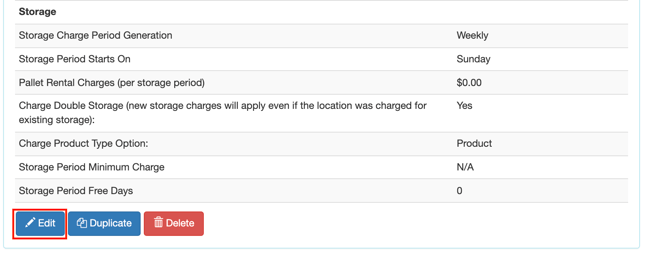
-
Scroll down to the Sale Order and Purchase Order settings.
-
Select the charging method from the drop-down menu under Putaway Charge Option and Picking Charge Option.
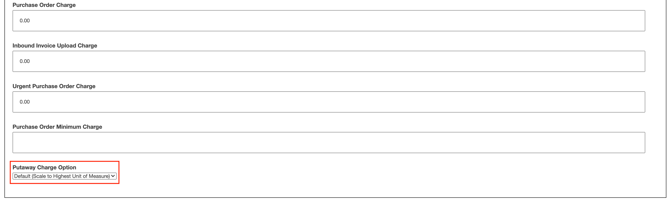
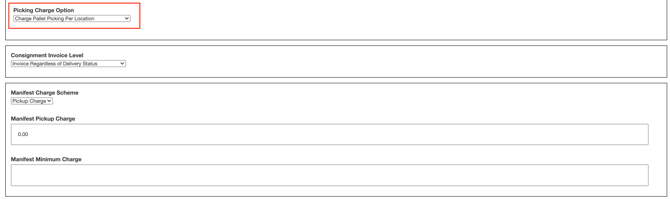
If you select Default (Scale to Highest Unit of Measure), you will need to choose a charge aggregation option. See Charge Aggregation options for more information.
- Scroll down to the bottom of the page and select Save.
Putaway (Purchase Order) handling fee algorithm
There are two different ways in which Putaway fees can be automatically calculated.
Default (Scale to Highest Unit Of Measure): CartonCloud will scale the products to the highest unit of measure and charge that way.
Note that if you select Default (Scale to Highest Unit of Measure), you will need to select a charge aggregation option. See Charge Aggregation options for more information.
Charge Base Unit Of Measures: CartonCloud will always charge by the base unit of measure.
The following table explains the difference between each of the two methods:
|
Situation |
Default (Scale to Highest Unit of Measure) with no aggregation |
Charge Base Unit of Measure |
|
Put 1 carton into a location |
Charge a carton put-away |
Charge a carton put-away |
|
Put 1 pallet into a location (i.e., A product that is measured in pallets) |
Charge a pallet put-away |
Charge a pallet put-away |
|
Put 10 cartons into one location, with no conversion to pallets. |
Charge 10 carton put-aways |
Charge 10 carton put-aways |
|
Put 48 cartons into one location, and there's a conversion where 48 cartons = 1 pallet. |
Charge a pallet put-away |
Charge 48 carton put-aways |
|
Put 47 cartons into one location, and there's a conversion where 48 cartons = 1 pallet. |
Charge 47 carton put-aways |
Charge 47 carton put-aways |
|
Put 49 cartons into one location, and there's a conversion where 48 cartons = 1 pallet. |
Charge 1 pallet put-away + 1 carton put-away |
Charge 49 carton put-aways |
|
Put 49 cartons into one location, and there's no conversion from cartons to pallets. |
Charge 49 carton put-aways |
Charge 49 carton put-aways |
Picking (Sale Order) handling fee algorithms
There are several different ways in which Picking fees can be automatically calculated.
Default (Scale to Highest Unit Of Measure): CartonCloud will scale the products to the highest unit of measure and charge that way.
Note that if you select Default (Scale to Highest Unit of Measure), you will need to select a charge aggregation option. See Charge Aggregation options for more information.
Charge Base Unit of Measures: CartonCloud will always charge by the base unit of measure.
Intelligently Charge Pallet Picks Where Possible: if the location went empty when you picked the order, it would charge a pallet pick if it is cheaper. When a quantity is picked that is more than the unit to pallet conversion, CartonCloud will charge 1 pallet pick + the extra number of units left that don't make up a pallet, unless the unit picks cost more than a pallet pick.
Charge Pallet Picking Per Location: It will always charge a pallet pick regardless of what quantities you have picked.
The following table explains the difference between each of the three methods:
|
Situation |
Default (Scale to Highest Unit of Measure) - with no aggregation |
Charge Base Unit of Measure |
Intelligently Charge Pallet picks where possible |
Charge Pallet Picking Per Location |
|
Picking 1 carton from one location |
Charge a carton pick |
Charge a carton pick |
Charge a carton pick |
Charge a pallet pick |
|
Picking 1 pallet from one location (i.e., A product that is measured in pallets) |
Charge a pallet pick |
Charge a pallet pick |
Charge a pallet pick |
Charge a pallet pick |
|
Picking 10 cartons from one location, with no conversion to Pallets |
Charge 10 carton picks |
Charge 10 carton picks |
Will anything be left in the location after picking? |
Charge a pallet pick |
|
Picking 48 cartons from one location, and there's a conversion where 48 cartons = 1 pallet. |
Charge a pallet pick |
Charge 48 carton picks |
Charge a pallet pick |
Charge a pallet pick |
|
Picking 47 cartons from one location, and there's a conversion where 48 cartons = 1 pallet. |
Charge 47 carton picks |
Charge 47 carton picks |
Will anything be left in the location after picking? |
Charge a pallet pick |
|
Picking 60 cartons from one location, and there's a conversion where 48 cartons = 1 pallet. |
Charge 1 pallet pick + 12 carton pick |
Charge 49 carton picks |
Charge 1 pallet pick + 12 carton pick, unless if 12 carton picks cost more than 1 pallet pick then it would be Charge 2 pallet picks. |
Charge a pallet pick |
|
Picking 49 cartons from one location, and there's no conversion from cartons to pallets. |
Charge 49 carton picks |
Charge 49 carton picks |
Will anything be left in the location after picking? |
Charge a pallet pick |
Location-based is based on the locations for the whole order - i.e. will consolidate order lines to per location per order only.
For Bulk Locations (Multiple Pallets), the charging and allocation are based on the Pallet IDs created when allocating purchase order stock to bulk locations.