
Table of Contents
How to access your Invoices
- Navigate to the Invoices page, More > Invoices.
- Select the relevant invoice.
This video shows how you can access your Invoices to download a copy, view the detailed breakdown of charges and access all the POD's relating to an Invoice in one simple download.
Invoice Summary
CartonCloud automatically creates a detailed summary for each Invoice as a spreadsheet, with tabs for Warehouse Summary, then detailed tabs for Purchase Orders, Sales Orders and Storage, and then Transport Summary with a detailed tab for Consignments and Manifests.
To download the Invoice spreadsheet, Click the Download Summary button on the Invoice Details page.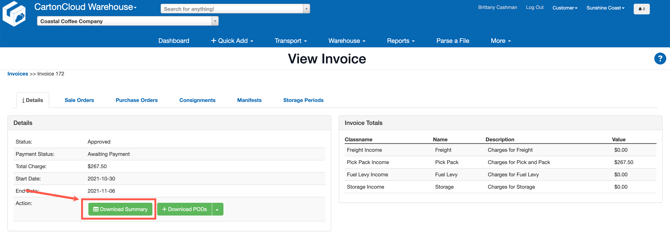
You can also use the individual tabs to view the charges associated with the Sale Orders, Purchase Orders, Consignments, Manifests and Storage Periods.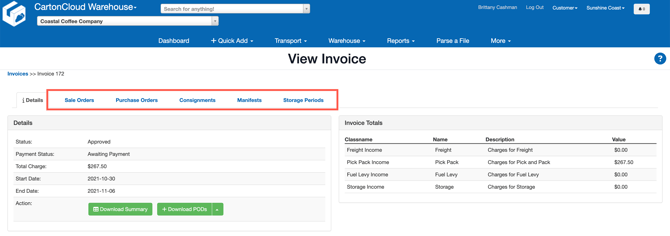
Download Bulk POD's
To download all the POD's received for that invoice:
- Click the Download POD button on the Invoice Details tab.
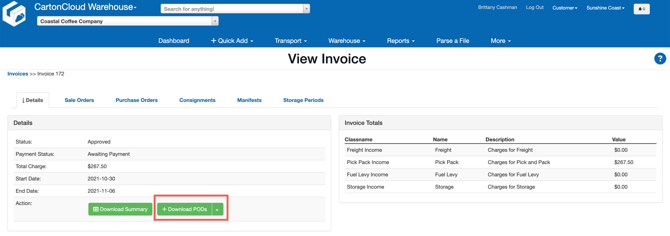
- You will notice a message in the Notification Centre (notification bell in the top right) advising that your request is being processed.

- When CartonCloud has finished processing your request the Notification Centre (notification bell in the top right) will again alert you with a message advising that the Export is complete. Click the Notification Centre and then click Download Here.