
|
Placeholder |
Description |
| $ID$ | The ID of the Sale Order |
| $COMPANY_NAME$ | The name of the Customer |
| $PACK_STATUS$ | The current status of the Sale Order |
| $SUM_VALUE$ | The value assigned to the Sale Order if any |
| $CUSTOMER_REFERENCE$ | The Reference for the Sale Order |
| $DELIVERY_ADDRESS$ | The Delivery Address for the Sale Order |
| $DELIVERY_ADDRESS_STREET_2$ | The second line of the delivery address (e.g suite, apartment number) |
| $SO_DATE_ADDED$ | Date Added |
| $SO_URGENT$ | Displays either Yes or No depending on whether or not the Sale Order is urgent |
| $DELIVERY_ADDRESS_COUNTRY$ $WAREHOUSE_ADDRESS_COUNTRY$ |
Address Country |
| $WAREHOUSE_NAME$ | The Warehouse name that the Sale Order is in. |
| $TODAY_DATE$ | The date the Pick List was printed |
| $PACKING_INSTRUCTION$ | The Packing Instructions for the Sale Order |
| $DELIVERY_INSTRUCTION$ | The Delivery Instructions for the Sale Order |
| $BLOCK_INSTRUCTION$ | Used as a template block replace. If you have an instructions section that you want to hide if there are no instructions then put this tag above and below the section to hide. It will get cleaned up if no Packing or Delivery instructions are on the Sale Order. If there are instructions then this text will get cleaned up and the relevant instructions and other content will be displayed |
| $CHARGE_NAME$ | Used for displaying any Adhoc Charge field names. Used in conjunction with $BLOCK_ADHOC_CHARGE$ tags |
| $BLOCK_ADHOC_CHARGE$ | Used as a template block replace. If you have any Sale Order Adhoc Charges configured to show on the Pick List page then they will appear where these tags wrap a section of the template and the $CHARGE_NAME$ tag is used within. If there are no Sale Order Adhoc Charges, then these tags and any content they wrap will be cleaned up and won't appear |
| $SO_CF_1_VALUE$ | The Sale Order Custom Field value. The 1 will need to be replaced with the relevant Custom Field number. |
| $ADDRESS_COMPANY_NAME$ | Company name set on the Address of the Sale Order |
| $ADDRESS_CONTACT_NAME$ | Contact name set on the Address of the Sale Order |
| $ADDRESS_SUBURB$ | The suburb of the Address of the Sale Order |
| $ADDRESS_CITY$ | City of the Address of the Sale Order |
| $ADDRESS_STREET$ | Street address of the Address of the Sale Order |
| $ADDRESS_POSTCODE$ | Postcode of the Address of the Sale Order |
| $ADDRESS_STATE$ | National State of the Address of the Sale Order |
| $DELIVERY_ADDRESS_EMAIL$ | The email address associated to the delivery address |
| $TENANT_NAME$ | Name of the current CartonCloud Organisation (Tenant) |
| $TENANT_WEBSITE$ | Website configured in the Organisation Settings of the current Tenancy |
| $TENANT_PHONE$ | Phone number configured in the Organisation Settings of the current Tenancy |
| $DELIVERY_RUN_NAME$ | Name of the Delivery Run |
| $EXPECTED_DELIVERY_RUN_NAME$ | Name of the expected Delivery Run |
| $REQUIRED_DELIVERY_DATE$ | Required date of delivery of the Consignment |
| $EXPECTED_DELIVERY_RUN_DATE$ | Expected delivery run date of the Consignment |
| $REQUIRED_SHIP_DATE$ | Required ship date of the Consignment |
| PRODUCT FIELDS: | |
| $CODE$ | The Product Code |
| $NAME$ | The Products Name |
| $COMPANY_NAME$ | The name of the Customer that the Product belongs to |
| $LOCATION_NAME$ | The name of the Warehouse Location that the Sale Order Product is being picked from |
| $EXPIRY_DATE$ | The expiry date of the linked POP if applicable |
| $WARNING$ | Picking information. |
| $PRODUCT_TYPE$ | The type of the product, ie: Frozen, Chilled, Ambient etc. |
| $PRODUCT_STATUS$ | The status of the product: "OK", "Quarantine", "Damaged" etc. |
| $QTY$ | The quantity of the product, always provided in the Base Unit of Measure |
| $MEAS$ | The Unit Of Measure of the Product, as Base. |
| $PO_REFERENCE$ | The Reference of the Purchase Order that the POP that the Sale Order Product is taking stock from |
| $POP_FIELD_VALUE_1$ | The Purchase Order Product's Custom Field 1, eg: Batch Number |
| ...$POP_FIELD_VALUE_10$ | (1, 2 ... 10) for the above |
| $POP_FIELD_HEADING_1$ | The heading of the linked POP custom field 1. Used in conjunction with $POP_FIELD_VALUE_1$ for showing the corresponding field value |
| ...$POP_FIELD_HEADING_10$ | (1, 2 ... 10) for the above |
| $POP_PALLET_BARCODE$ | Displays the pallet barcode value |
| $SOP_CF_X_VALUE$ | Sale Order Product Custom Fields, where X is the number of the Custom Field. |
| WAREHOUSE ADDRESS (information is pulled from the address linked to the warehouse in CartonCloud) | |
| $WAREHOUSE_ADDRESS$ | Address of the warehouse |
| $WAREHOUSE_ADDRESS_STREET_2$ | The second line of the warehouse address (e.g the suite or apartment number) |
| $WAREHOUSE_ADDRESS_COMPANY$ | Company name listed against the address linked to the warehouse |
| $WAREHOUSE_ADDRESS_STREET$ | The street name of the warehouses' address |
| $WAREHOUSE_ADDRESS_SUBURB$ | Suburb name of the warehouses' address |
| $WAREHOUSE_ADDRESS_CITY$ | City name of the warehouses' address |
| $WAREHOUSE_ADDRESS_STATE$ | State name of the warehouses' address |
| $WAREHOUSE_ADDRESS_CODE$ | The warehouses' address postcode |
| $WAREHOUSE_ADDRESS_PHONE$ | The phone number listed against the address linked to the warehouse |
| $WAREHOUSE_ADDRESS_CONTACT$ | The contact listed against the address linked to the warehouse |
| $WAREHOUSE_ADDRESS_REAL_CODES$ | |
| $WAREHOUSE_ADDRESS_EMAIL$ | The email listed against the address linked to the warehouse |
| $WAREHOUSE_ADDRESS_LATITUDE$ | Latitude coordinate of the warehouses' address |
| $WAREHOUSE_ADDRESS_STARRED$ | If the warehouses' address is starred |
| $SO_QTY_TOTAL_SOPS$ | Sales Order Products total quantity |
| $SKU_TOTAL$ | Sales Order total SKU |
| $NA_ADDRESS$ | Address in North America address format |
| $NA_PICKUP_ADDRESS$ | Pickup Address in North America address format |
| $NA_DELIVERY_ADDRESS$ | Delivery Address in North America address format |
| $NA_ONFORWARDER_ADDRESS$ | Onforwarder Address in North America address format |
| $BLOCK_ADHOC_CHARGE_QTY>0$ | Displays Adhoc Charges table (only displays charges with a value greater than 0) |
| $SOP_PRODUCT_*XXX*_UOM_QTY$ | Converts Sale Order base unit of measure quantity to the unit of measure specified. E.g $SOP_PRODUCT_CTN_UOM_QTY$ to show all units in Cartons |
| $SOP_BASE_UOM_QTY$ | Displays the quantity of the sale order product using the base unit of measure |
| $SOP_BASE_UOM_MEAS$ | The base unit of measure code for the sale order product |
| $SOP_OPTIMAL_PICK_UOM_QTY$ | Displays the quantity of the sale order product using the optimal pick unit of measure |
| $SOP_OPTIMAL_PICK_UOM_MEAS$ | The optimal pick unit of measure code for the sale order product |
| $SO_WEIGHT_TOTALS$ | Sale Order Products total weight |
| $SO_REQUESTED_SHIPPING_SERVICE$ | The shipping service selected for the order |
Sorting
Within the delivery note you can choose to sort by product code, location, product name, product type, product description and quantity. You can choose to sort by ascending and descending. To add sorting configurations to your template use the below placeholders and place the placeholders above the Product table's headers.
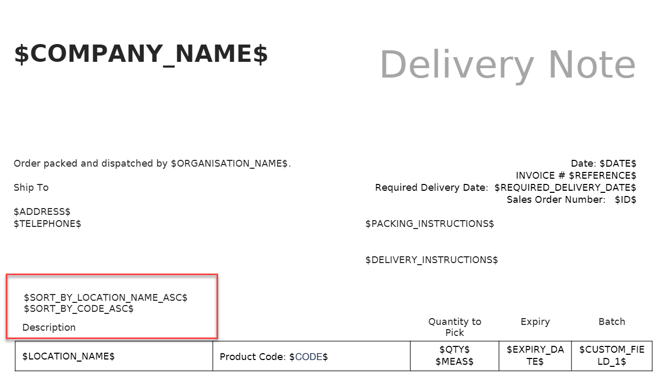
$SORT_BY_{TAG}_{DIRECTION}$
The following values for TAG are supported:
-
CODE (product code)
-
LOCATION_NAME
-
NAME (product name)
-
PRODUCT_TYPE
- PRODUCT_WEIGHT
-
PRODUCT_DESCRIPTION
-
QTY
-
PRODUCT_CF_(1-10),
-
POP_CF_(1-10)
-
SOP_CF_(1-5)
The following values for DIRECTION are supported:
-
ASC
-
DESC
Example: $SORT_BY_PRODUCT_TYPE_ASC$