
Table of Contents
Purpose
As a consignment changes status within the CartonCloud mobile apps the user interface will display different prompts to this is highlighted by changing its background colour in both of the list views, as well as modifying its pin colour on the map view.
Consignment status colours
| Colour | Status | Notes |
| White | Normal | Waiting for Action. |
| Purple | Error Lodged | An error has been lodged for this consignment. |
| Orange | Point To Point Stage 1 (Pickup) Completed | The consignment is a Point to Point consignment and the first stage (Pickup) has been completed |
Map view pin colours
Consignments pins on the map view change colour depending on the consignment status in the same way as illustrated above for list views. The below image and table highlight what each different coloured pin represents. To distinguish a Pickup consignment in normal status from a Point To Point consignment, Point to Point consignments are displayed as "split" pins, showing them as containing both a Pickup and a Delivery stage with the pin numbers illustrating which stage of the Point to Point consignment the pin relates to - (1) or (2).
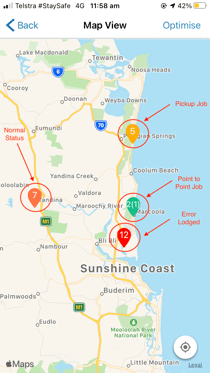
| Colour | Status |
| Dark Orange | Normal |
| Light Orange | Pickup Job |
| Red | Error Lodged |
| Green (with "split" split pins showing both a Pickup and a Delivery stage) | Point to Point Job |