Table of Contents
- What is an accounting connector
- How to set up an Accounting Connector
- How to configure the Accounting connector settings
- Multiple Accounting Connectors
What is an accounting connector
CartonCloud can integrate with accounting software applications (in CartonCloud, called Accounting Connectors) to streamline your invoicing process. Once connected, you will be able to send invoices directly from CartonCloud to the accounting platform and have the payment status from the accounting platform automatically updated in CartonCloud.
How to set up an Accounting Connector
CartonCloud integrates with the following accounting software applications:
| Accounting Connector | How to set up the Accounting Connector |
| Xero | Integrate CartonCloud with Xero |
| MYOB Accounting Right Live | Integrate CartonCloud with MYOB (Account Right Live) |
| QuickBooks | Integrate CartonCloud with QuickBooks |
| Reckon | Integrate CartonCloud with Reckon |
How to configure the Accounting Connector Settings
Each software application has its specific options, which can be configured in CartonCloud. You can either configure these at the Organisation or Customer Settings level.
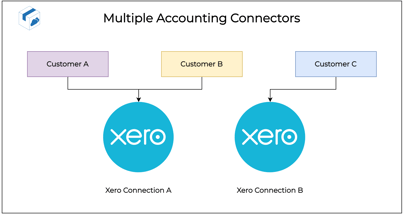
Multiple Accounting Connectors
CartonCloud supports multiple simultaneous Accounting Software Connections. This means you could have several MYOB connections, several Xero connections, or a combination of both within a single CartonCloud Account. You can then link some customers to one Accounting Connector and others to the other.