
Table of Contents
Purpose
This article details how to delete a Purchase Order and therefore remove the stock which came into the warehouse on that Purchase Order from your warehouse.
How to steps
- Navigate to the Purchase Order page, Warehouse > Purchase Order.
- Select the Purchase Order you wish to delete.
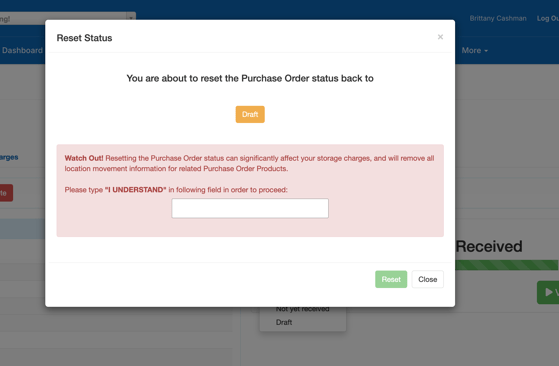
- Revert the status of the order to Draft.
Only Purchase Orders that are in Draft status can be deleted
- After reading the warning prompt, if you wish to still proceed, type I UNDERSTAND in the pop-up box.
- Click the Delete button.
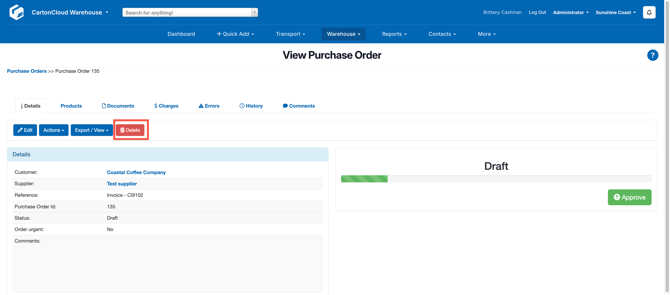
- A prompt asking, if you are sure, will appear on the screen, select OK.
Errors when deleting purchase orders
It is possible for errors to appear when a user is attempting to delete a Purchase Order.
"Purchase Order contains Products which are associated with Packed Sale Orders"
This error indicates that there is Purchase Order Products associated with the Purchase Order which are still linked to a Sale Order in Packed or Dispatched status, even when the Purchase Order Product has the same Initial/Onhand/Free quantity.
The error is caused by the following steps:
- A Sale Order takes stock from an allocated Purchase Order
- The Sale Order is Packed/Dispatched
- A product on the Sale Order is edited/deleted creating a post-pack correction, putting the stock back onto the Purchase Order Product record, but still maintaining a link as to what "should" have been picked.
As the link between Sale Order and Purchase Order still exists, this prevents the Purchase Order from being deleted.
How to Resolve:
This error can be resolved by removing the link between Sale Order and Purchase Order. Note, if you have multiple affected Sale Order Products, you'll need to repeat these steps for each affected Sale Order:
- Using the links provided, navigate to the affected Sale Order Product record.
- From here, use the link to get to the associated Sale Order
- Revert the status of the Sale Order to "Awaiting Pick and Pack" as shown below.
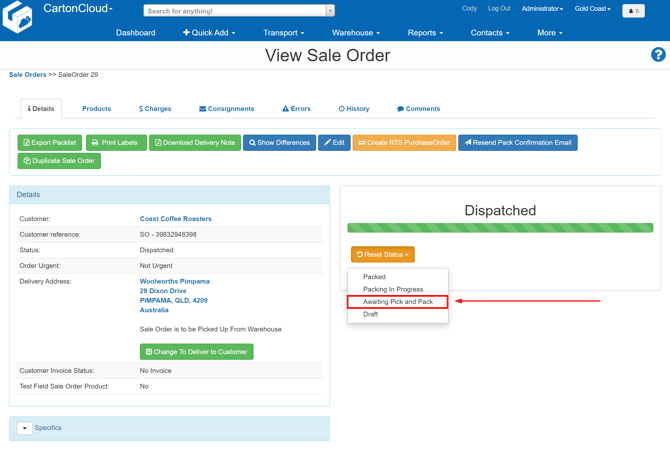
When the status is reverted, all post-pack corrections are removed from the order, removing the link to the Purchase Order. You can now delete the Purchase Order.
You can also mark the order as packed in one-step using the Complete Packing button.