
Table of Contents
- Purpose
- Turning it on for all customers
- Turning it on for an individual customers
- How it works
- Updating or adding additional invoices
Purpose
CartonCloud can be configured to automatically copy Customer Invoices from a Sale Order to a Consignment generated by the Sale Order. This includes invoices which are attached to Sale Orders through a Parser. This setting can either be turned on at the Organisation Level (through organisation settings) or individually for each customer, through the Edit Customer page.
Turning it on for all customers
If you wish for this behaviour to apply to all of your customers this can be done by first turning on the corresponding Organisation Setting.
- Go to the main menu and select More > Organisation Settings
- Select the Warehouse tab.
- Then change the setting Copy Sale Order Customer Invoice to Consignment to Yes.
Turning it on for an individual customer
If you wish for this behaviour to apply to a particular customer this can be done by turning on the setting for that customer.
- Go to the main menu and select Contacts > Customers
- Select the Customer you wish to turn this on for
- Select Edit towards the bottom left of the page
- Select the Warehouse Management tab (the Sale Order sub-tab will automatically be selected)
- Scroll down to the Consignment settings heading
- Then change the setting Copy Sale Order Customer Invoice to Consignment to Yes
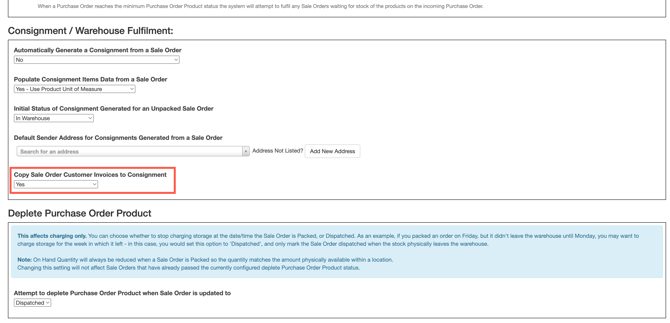
- Scroll to the bottom of the page and select Save for the change to be applied.
How it works
When a Sale Order is created in CartonCloud an option is provided for the corresponding Customer Invoice to be attached to the order.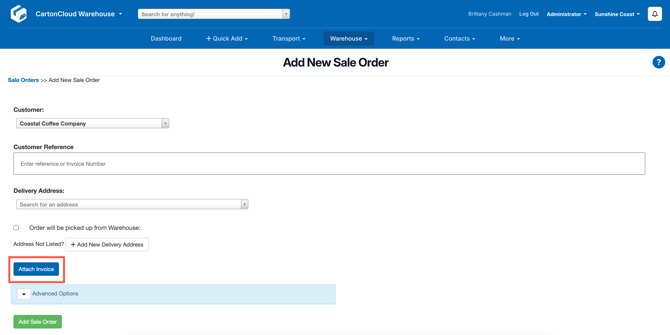
Alternatively, the Invoice can be attached at a later time using the Customer Invoices tab.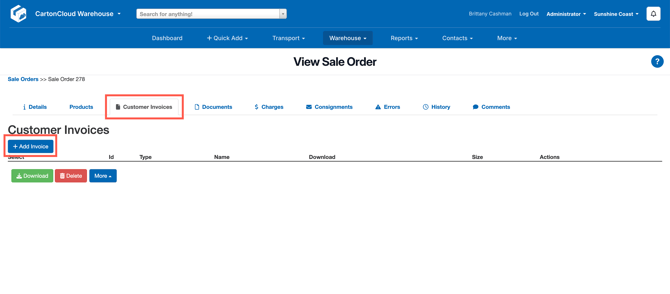
Now, when the Consignment is generated either automatically upon pack completion or through the Consignments tab the Customer Invoice will be copied across to the Consignment.
Updating or adding additional invoices
If another Invoice is attached to the Sale order after the consignment has been generated then it will automatically be attached to the Consignment.
Deleting an invoice from a Sale Order will not result in that same invoice being deleted from the linked consignment, so deletion will need to be completed separately for both records.