
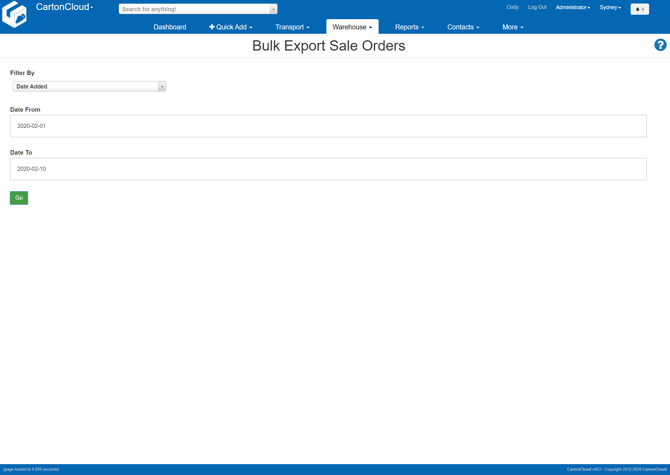
To access the Bulk Export Sale Order page select Reports in the main menu, followed by Bulk Export Sale Orders in the drop-down menu.
The Bulk Export Sale Order page allows you to export a CSV spreadsheet from CartonCloud containing all data associated with your Sale Orders.
Each Sale Order Product record on a Sale Order will generate a new row on the report.
To generate the report, select how you wish to filter the report, Date Added or Last Modified.
Then choose the beginning and ending dates for the report to run.
Finally, select Go and the CSV file will be downloaded.
Report Fields
The generated report will contain the following fields for each Sale Order Product line.
-
id
-
customer
-
customer_reference
-
status
-
invoice_status
-
date_added
-
last_modified
-
adjustment
-
value
-
order_urgent
-
customer_requested_urgent
-
income
-
expense
-
packer
-
pack_time_estimated
-
pack_time
-
packing_instruction
-
delivery_instruction
-
charge_error
-
cash_on_delivery
-
cash_on_delivery_value
-
requested_delivery_run
-
expected_delivery_run
-
carrier_name
-
require_delivery_date
-
required_ship_date
-
pickup_from_warehouse
-
finish_pack_time
-
dispatched_datetime
-
future_dispatch_date
-
wave_pick_id
-
customer_field_1 to 10
-
address_company_name
-
contact_name
-
street_address
-
suburb
-
city
-
state
-
postcode
-
country
-
email
-
telephone
-
active
-
warehouse
-
charge_scheme
-
invoice_id
-
expense_charge_scheme
-
bill_id
-
sale_order_product_id
-
customer_code
-
product_name
-
product_type
-
product_status
-
warehouse_location
-
pallet_id
-
product_unit_of_measure
-
unit_quantity
-
expiry_date
-
picked_qty
-
packed_qty
-
pop_custom_field1 to 10